get.chat WhatsApp Integration API (1.28.0)
Download OpenAPI specification:Download
| Version | Version date |
|---|---|
| 1.28.0 | 2026.09.22 |
WhatsApp Integration API allows you to use your WhatsApp Business Account with many messaging solution concurrently. It lets you integrate your favorite chat solution with any chatbot or CRM you prefer.
Your deployment documentation might differ if you participate in our beta program.
Note that you can participate in our beta program only if you directly ask us. If you don't participate, the API is the same as in publicly available documentation.
For your instance-specific docs, go to https://{YOUR_STACK_NAME}.inbox.getchat.360dialog.io/api/.
To get YOUR_STACK_NAME value, check the URL of your inbox instance or URL of your instance admin panel.
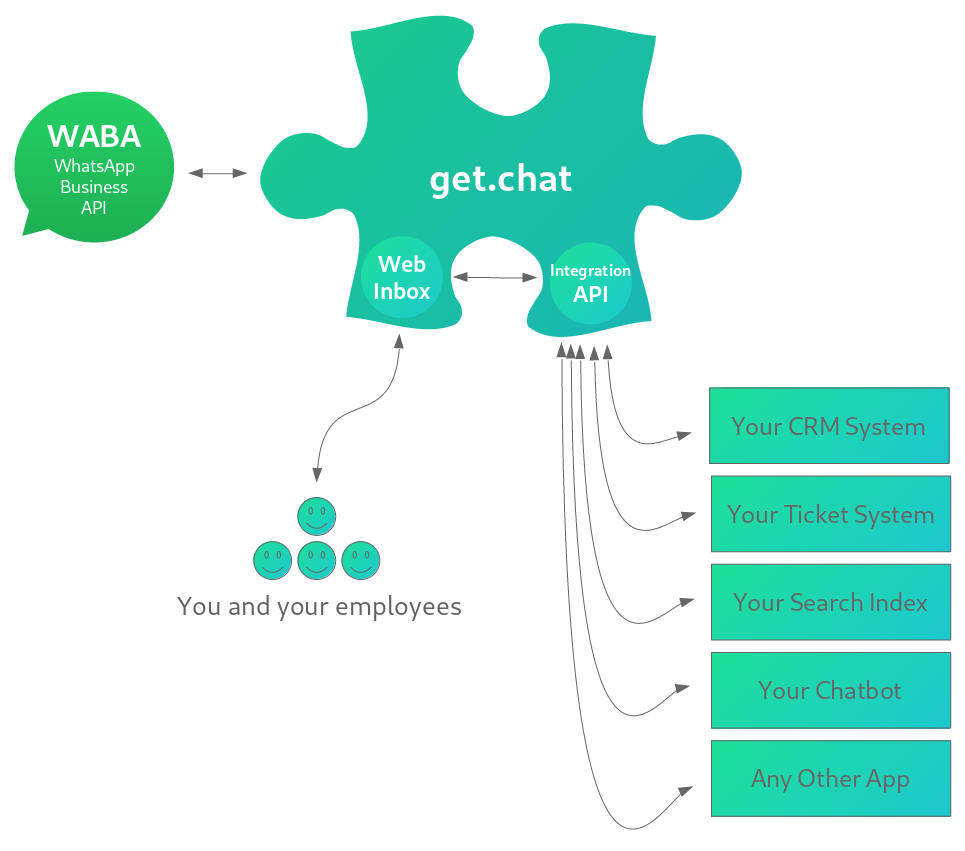
A missing puzzle piece
 |
|---|
| Our API and Inbox together make a missing puzzle piece you always needed. |
WhatsApp Integration API and Web Inbox act as an extension layer for WhatsApp Business API (WABA). Here is a list of benefits of using both of the solutions:
| Feature | Web Inbox | WhatsApp Integration API | WABA |
|---|---|---|---|
| Connect unlimited simultaneous apps to your WA Business account | N/A | ✅ | ❌ |
| Graphical user interface for you and your employees | ✅ | N/A | ❌ |
| Multi-user access to sending and receiving of your WA Business account messages | ✅ | ✅ | ❌ |
| Search within the last 1.5 mio messages | ✅ | ✅ | ❌ |
| Deeplinking into message threads | ✅ | ✅ | ❌ |
Synchronize each app (or system) separately
|
N/A | ✅ | ❌ |
FAQ
How is WhatsApp Integration API different from other integration platforms?
It is an integration platform specially designed for WhatsApp Business API, focusing only on functions around WhatsApp and typical solutions integrating into WhatsApp. Every number has its own database and the Integration API syncs incoming messages actively into all integrated solutions.
Where are messages stored?
Messages are stored in an own database per number in the Integration API until a threshold of 1.5 million messages is reached. So different accounts do not share the same database.
Which limitations does the system have?
Message volume is limited on 1.5 million messages. System does not have it’s own routing system or rule engine.
Is a search index part of the Integration API or is an external solution needed?
Search for up to 1 Million messages is supported, but when search function for more messages is needed, then an external search index is needed to be used.
How can routing rules be applied to the system
Routing rules are manageable either through CRM or ticketing solution or through any external rule engine.
Which functions apply to the Integration API?
The Web Inbox is just a frontend of the Integration API. There are not (yet) any additional functions on the frontend level.
Your inbox is reachable at https://{YOUR_STACK_NAME}.inbox.getchat.360dialog.io/ and all API endpoints are reachable at https://{YOUR_STACK_NAME}.inbox.getchat.360dialog.io/api/v1/.
For example, sending a POST to /api/v1/auth/token/ means sending a POST to https://{YOUR_STACK_NAME}.inbox.getchat.360dialog.io/api/v1/auth/token/.
Different base URL for each inbox is connected to providing separate servers and databases for your inbox, so that all your data is well isolated from other inboxes.
Currently, there are three ways of authorization available:
Token authorization is designed for accessing the API from your own services / apps / chatbots.
Session authorization mechanism is what is used by default when logging into the admin panel.
Provider authorization can be used when you need to log in using WABA Stack provider credentials (360dialog).
See below sections for more details.
Token authorization should be preferred.
Each of your service or app or chatbot that will reach the API needs to have its own User account and authorization token bound to the account.
There are two ways to create a new User:
- See post Create a New User endpoint
- or create a new User using the Admin Panel
This type of authorization is done with Authorization: Token <token> header,
where <token> value needs to be obtained first.
To obtain a token, send POST to /api/v1/auth/token/ with username and password fields either as JSON fields
or POST data.
- See post Create Auth Token for request body schema
Example:
curl -H "Content-Type: application/json" \
    -H "Accept: application/json" \
    -X POST \
    https://{YOUR_STACK_NAME}.inbox.getchat.360dialog.io/api/v1/auth/token/ \
    --data "{\"username\": \"peter\", \"password\": \"secret\"}"
When valid username and password are provided, API reply with a (new or existing available) token
in JSON body field token, for example:
{"token": "8aeb44f5a318542d32bb13019d68198467ee21f0"}
Make sure all authorization requests are done via HTTPS connection, otherwise username and password are not encrypted.
Each accessible page will provide to you with CSRF token, for example:
HTTP/1.1 200 OK
Set-Cookie:  csrftoken=TezohQtkhqw03yaiSOyvOVFymCeIm3VfdYKLkaG33DWz0lgR7nVroQREeV3Hj3Rw; expires=Thu, 20 Jan 2022 11:19:51 GMT; Max-Age=31449600; Path=/; SameSite=Lax
API endpoints are not accessible until you authorize (either by token or session),
but several pages are accessible without authorizing.
For example, you can send a GET request to /api/v1/ and obtain token this way.
This unique token identifies you, so that's why it should be saved as cookie and then used later on in further requests.
After logging in via official form /login/, you will obtain sessionid too, for example:
HTTP/1.1 302 Found
Set-Cookie: csrftoken=mc73th9HxjMpy5UuCC3981LZeE0jt8sH4i8Md8BZoy9Agygv9M7WimALSVXCV1hL; expires=Thu, 20 Jan 2022 14:48:54 GMT; Max-Age=31449600; Path=/; SameSite=Lax
Set-Cookie: sessionid=mdsxd9cczt27tp2d806hfi245emmxuvk; expires=Thu, 04 Feb 2021 14:48:54 GMT; HttpOnly; Max-Age=1209600; Path=/; SameSite=Lax
These two cookies identify you as a logged in user. Thanks to them no 'Authorization' header is needed,
but Cookie header should be used instead with above cookies.
Provider authorization can be used when you need to log in using WABA Stack provider credentials (360dialog).
To authenticate using Provider method, provide 360dialog API Key header when calling the API.
For example:
curl -H "D360-Api-Key: xEZOvMBDS6zEZtbR2xCJkP5R75szhCUIvMH" \
     -H "Accept: application/json" \
     -X GET \
     https://{YOUR_STACK_NAME}.inbox.getchat.360dialog.io/api/v1/users/current/
Integration API will then reach to 360dialog and will ask 360dialog systems if the key is valid.
If the provided D360-Api-Key is valid, you will be authenticated as Integration API admin User.
If there are more than one admin group members, you will be authenticated as the admin User that was registered
when the inbox was created for the first time.
If said User is no longer active or was removed, this method will authenticate you as an admin User
of following conditions:
- this User's account is still active (when you decide a particular User should no longer have the access, User accounts are marked as inactive instead of removed)
- this User's account creation date is the oldest
If provided API Key is invalid, this method will silently fail and then Token and Session auth methods will be checked.
That means if invalid D360-Api-Key is the only authorization data provided, you will see a following response:
HTTP/1.1 403 Forbidden
{"detail":"Authentication credentials were not provided."}
Note that above example calls Retrieve Current User endpoint and will show you the exact account that was authenticated during your request. For example:
curl -H "D360-Api-Key: xEZOvMBDS6zEZtbR2xCJkP5R75szhCUIvMH" \
     -H "Accept: application/json" \
     -X GET \
     https://{YOUR_STACK_NAME}.inbox.getchat.360dialog.io/api/v1/users/current/ \
    | python -m json.tool

{
    "url": "https://{YOUR_STACK_NAME}.inbox.getchat.360dialog.io/api/v1/users/2/",
    "id": 2,
    "username": "peter",
    "first_name": "Peter",
    "last_name": "Rabbit",
    "email": "peter@example.com",
    "profile": {
        "role": "admin"
    },
    "groups": [
        {
            "id": 3,
            "name": "Admin"
        }
    ],
    "permissions": {
        "can_use_tags": true,
        "can_read_chats": "all",
        "can_write_to_chats": "all"
    }
}
Each endpoint described later in the docs has to be accessed with HTTP Request with SSL and one of available authorization methods: Token, Session or Provider.
When making POST requests, JSON data specified in the docs has to be sent as POST data payload.
Base URL shown in this documentation is https://{ YOUR_STACK_NAME }.inbox.getchat.360dialog.io/
To get YOUR_STACK_NAME value, check the URL of your inbox instance or URL of your instance admin panel.
Example for GET request with curl:
curl \
    -H "Authorization: Token 8aeb44f5a318542d32bb13019d68198467ee21f0" \
    -X GET \
    https://{YOUR_STACK_NAME}.inbox.getchat.360dialog.io/api/v1/chats/ \
    -H "Accept: application/json"
Example for POST request with curl:
curl -H "Authorization: Token 8aeb44f5a318542d32bb13019d68198467ee21f0" \
    -H "Content-Type: application/json" \
    -H "Accept: application/json" \
    -X POST \
    https://{YOUR_STACK_NAME}.inbox.getchat.360dialog.io/api/v1/messages/ \
    --data "{\"wa_id\": \"48123456789\", \"text\": {\"body\": \"Hello!\"}}"
Note that our API supports passing request payload parameters as either POST data application/json,
application/x-www-form-urlencoded or multipart/form-data.
You should start with /chats/ endpoint:
curl -H "Authorization: Token 8aeb44f5a318542d32bb13019d68198467ee21f0" \
    -X GET \
    https://{YOUR_STACK_NAME}.inbox.getchat.360dialog.io/api/v1/chats/ \
    | python -m json.tool

[
    {
        "wa_id": "48500500500",
        "new_messages": 11
    },
    {
        "wa_id": "4912312312312",
        "new_messages": 0
    },
    {
        "wa_id": "90123123123",
        "new_messages": 22
    }
]
Read more about /chats/ endpoint here.
You can use python -m json.tool to make the output more readable, but it is not necessary.
Above response makes it clear how many new messages you have and where to find them.
You can read each contact messages like this:
curl -H "Authorization: Token 8aeb44f5a318542d32bb13019d68198467ee21f0" \
    -X GET \
    https://{YOUR_STACK_NAME}.inbox.getchat.360dialog.io/api/v1/messages/?wa_id=48123123123&limit=1 \
    | python -m json.tool

{
    "count": 276,
    "next": "http://{YOUR_STACK_NAME}.inbox.getchat.360dialog.io/api/v1/messages/?wa_id=48123123123/&limit=1&offset=1",
    "previous": null,
    "results": [
        {
            "waba_payload": {
                "from": "48123123123",
                "id": "ABGGSFEBeRJ_AhD8o8zP9ulNeUPgdKvfzvgh",
                "timestamp": "1612544982",
                "type": "video",
                "video": {
                    "id": "20854d67-189e-4e78-a8ac-123sdf234ad",
                    "mime_type": "video/mp4",
                    "sha256": "da7f4ab0b60e7df1d1e8b0537bcdec3a86d605e79fa28333c4c1dc50561d86ac",
                    "link": "http://{YOUR_STACK_NAME}.inbox.getchat.360dialog.io/api/v1/media/20854d67-189e-4e78-a8ac-123sdf234ad/"
                }
            },
            "customer_wa_id": "48123123123",
            "from_us": false,
            "received": false,
            "sender": null
        }
    ]
}
Read more about /messages/ endpoint here. The main payload of the message is
waba_payload JSON field, which copies data returned by WhatsApp Business API. In waba_payload you will always
have information about type of the message, id, from and timestamp.
In above example, a limit=1 query parameter was used, so that only one message is returned, for readability of this
tutorial. In reality, you will be reading messages in batches, for example 20 messages:
curl -H "Authorization: Token 8aeb44f5a318542d32bb13019d68198467ee21f0" \
    -X GET \
    https://{YOUR_STACK_NAME}.inbox.getchat.360dialog.io/api/v1/messages/?wa_id=48123123123&limit=20
This endpoint returns to you most recent messages, ordered from newest to oldest.
Then, if you want to read next 20 (older) messages, you need to use before_time query parameter, indicating the POSIX
timestamp of the last message you had before (in previous batch). The API will then return 20 messages before given
timestamp:
curl -H "Authorization: Token 8aeb44f5a318542d32bb13019d68198467ee21f0" \
    -X GET \
    https://{YOUR_STACK_NAME}.inbox.getchat.360dialog.io/api/v1/messages/?wa_id=48123123123&limit=20&before_time=1612544982
The default pagination method is implemented as offset and limit params in most of the endpoints. But for this
endpoint, before_time is provided, to be able to paginate elements correctly, even when new messages arrive
at the time of pagination.
Whenever you think you no longer need these messages being indicated as new (in our first /chats/ call)
you can mark these messages as received. Marking messages as received by you is needed to generate proper lists of unread messages.
You can mark messages as received in three ways:
- Use
/mark_as_received/endpoint. - Use
mark_as_receivedparameter of/messages/endpoint. - Use WABA Webhook
The choice of method depends on your use case. For example, first method is useful when you prefetch these messages and then you make sure whether user received them or not (for example a web based app or mobile app). Second method, on the other hand, is handy when you are just passing messages from our inbox to some other system.
It is required to use one of above methods if you want to keep track of what was already received by your users, bots or any integrated systems. You want to keep track of it basically always, for example:
- when you implement any kind of indication of new/unread messages (on the frontend or in any other way)
- when you simply forward messages to your system in batches and would like to receive only fresh messages on each iteration
WABA Webhooks take care of it for you. It works the "old way" you should be familiar with if you used WhatsApp Business API before.
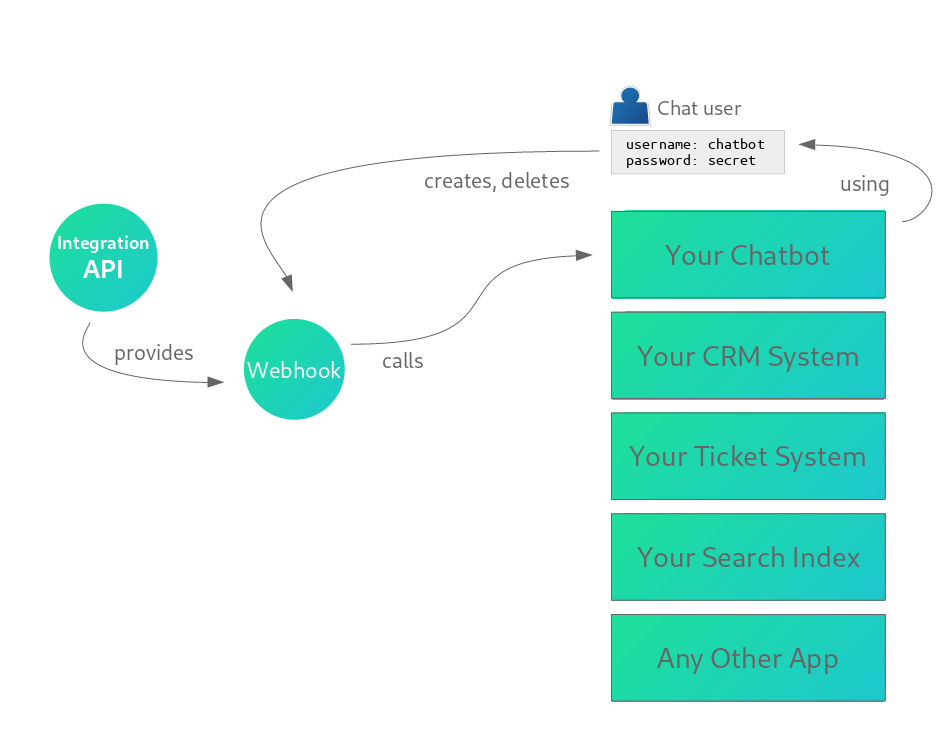
WhatsApp Integration API provides a (de)multiplexing solution of original WhatsApp Business API (WABA) webhook. WABA itself allows you to integrate only one webhook. With our API you can set up multiple per-user webhooks.
 |
|---|
| How Webhooks are created and used |
How to read above picture: Integration API provides Webhooks as a resource. Then you (manually), or your app (automatically) can create and delete Webhooks. In above example, your chatbot solution can create a Webhook, using proper username+password credentials. Then, Webhook calls your chatbot solution endpoint, triggered by specific events like incoming messages or status updates.
 |
|---|
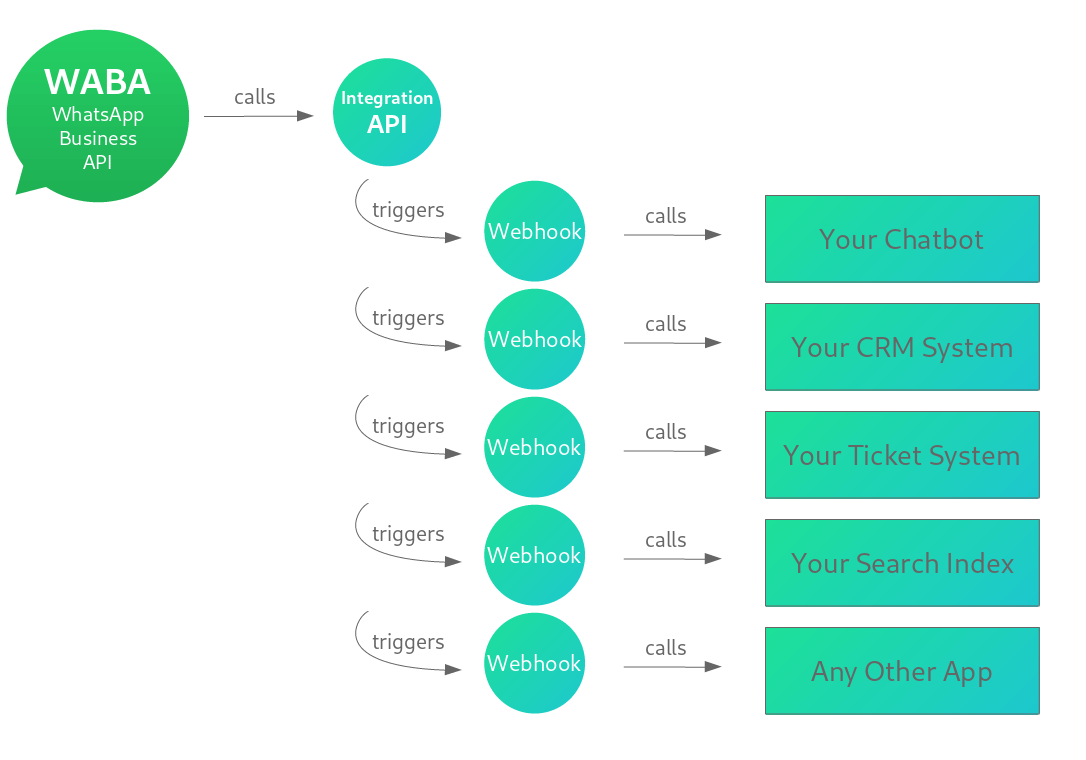
| How Multiple Webhooks are called |
Each WABA Webhook is configured per API user - Your Chatbot, Your CRM System etc.
One user can have multiple WABA Webhook configs, for example:
[{
    "id": 1,
    "user": {"id": 23, "username": "string", "url": "string"},
    "url": "http://example.com",
    "on_incoming_message": true,
    "on_outgoing_message": false,
    "on_assigned": false
}, {
    "id": 2,
    "user": {"id": 23, "username": "string", "url": "string"},
    "url": "http://example.com",
    "on_incoming_message": false,
    "on_outgoing_message": true,
    "on_assigned": false,
    "headers": {}
}, {
    "id": 3,
    "user": {"id": 23, "username": "string", "url": "string"},
    "url": "http://example.com",
    "on_incoming_message": false,
    "on_outgoing_message": false,
    "on_assigned": true,
    "headers": {"Authorization": "Token 8aeb44f5a318542d32bb13019d68198467ee21f0"}
}]
or you can have following webhooks:
[{
    "id": 1,
    "user": {"id": 23, "username": "string", "url": "string"},
    "url": "http://example.com",
    "on_incoming_message": true,
    "on_outgoing_message": true,
    "on_assigned": false
}, {
    "id": 2,
    "user": {"id": 23, "username": "string", "url": "string"},
    "url": "http://example.com",
    "on_incoming_message": false,
    "on_outgoing_message": false,
    "on_assigned": true,
    "headers": {"Authorization": "Token 8aeb44f5a318542d32bb13019d68198467ee21f0"}
}]
Additionally, you can set "on_message_echo": true to have your endpoint called whenever a message is sent
from your WhatsApp Business number via the 360dialog messaging API, outside of get.chat. Your endpoint then
receives the original Cloud API message_echoes payload, so your integration can keep a complete copy of the
conversation. Messages sent through the get.chat API are not echoed this way - use on_outgoing_message for those.
When WABA webhook calls our API, all created Webhooks are triggered and each of them is calling your configured endpoints.
You are not required to set up one webhook per one app (or system). If you want, you can configure only one webhook for all your apps, and then distribute messages and notifications to your apps yourself. One webhook per app however is the recommended method.
See following endpoints to learn more on how to manage your WABA Webhooks:
- get List WABA Webhooks
- post Create WABA Webhook
- get Retrieve WABA Webhook
- put Update WABA Webhook
- del Delete WABA Webhook
- get Test WABA Webhook
Correctly configured WABA Webhook will propagate webhooks incoming from WABA to each of your endpoints. Propagated webhook call will be exactly the same POST call as original WhatsApp Business API webhook:
POST /

{
  "contacts": [ {
    "profile": {
        "name": "sender-profile-name"
    },
    "wa_id": "wa-id-of-contact"
  } ],
  "messages": [ {
    "context": {
         "from": "sender-wa-id-of-context-message",
         "id": "message-id-of-context-message",
         "mentions": [ "wa-id1", "wa-id2" ],
         "forwarded": true | false,
         "frequently_forwarded": true | false
    },
    "from": "sender-wa-id",
    "id": "message-id",
    "timestamp": "message-timestamp",
    "type": "audio | document | image | location | system | text | video | voice",

    # If there are any errors the errors field (array) will be present.
    # The errors field can be returned as part of any callback event.
    "errors": [ { ... } ],

    "audio": {
        "file": "absolute-filepath-on-coreapp",
        "id": "media-id",
        "link": "link-to-audio-file",
        "mime_type": "media-mime-type",
         "sha256": "checksum"
    }

    "document": {
        "file": "absolute-filepath-on-coreapp",
        "id": "media-id",
        "link": "link-to-document-file",
        "mime_type": "media-mime-type",
        "sha256": "checksum",
        "caption": "document-caption"
    }

    "image": {
        "file": "absolute-filepath-on-coreapp",
        "id": "media-id",
        "link": "link-to-image-file",
        "mime_type": "media-mime-type",
        "sha256": "checksum",
        "caption": "image-caption"
    }

    "location": {
        "address": "1 Hacker Way, Menlo Park, CA, 94025",
        "latitude": latitude,
        "longitude": longitude,
        "name": "location-name"
    }

    "system": {
        "body": "system-message-content"
    }

    "text": {
        "body": "text-message-content"
    }

    "video": {
        "file": "absolute-filepath-on-coreapp",
        "id": "media-id",
        "link": "link-to-video-file",
        "mime_type": "media-mime-type",
        "sha256": "checksum"
    }

    "voice": {
        "file": "absolute-filepath-on-coreapp",
        "id": "media-id",
        "link": "link-to-audio-file",
        "mime_type": "media-mime-type",
        "sha256": "checksum"
    }
  ]
}
Standard Webhook Events and Notifications from 360Dialog are forwarded intact from the inbox to every Webhook configured with "cloud_api" events, with several extensions - new fields are added to the payload to provide more context.
"messages" - new fields are added to each message object:
"is_assigned_to_user"(boolean) -trueif the contact is assigned to a specific user,falseotherwise."is_assigned_to_group"(boolean) -trueif the contact is assigned to a specific group,falseotherwise.last_message_from_us_timestamp(string, nullable) - timestamp of the last message we sent to this contact through this Inbox, null if this never happened
Example:
{
  "object": "whatsapp_business_account",
  "entry": [
    {
      "changes": [
        {
          "value": {
            "messages": [
              {
                "from": "48123123123",
                "id": "wamid.ID",
                "timestamp": "1631105256",
                "text": {"body": "MESSAGE_BODY"},
                "type": "text",
                "is_assigned_to_user": true,
                "is_assigned_to_group": false,
                "last_message_from_us_timestamp": "1631105255"
              }
            ]
          }
        }
      ]
    }
  ]
}
"statuses" - a new field is added: "getchat_id" that will help you link messages and statuses using
get.chat's internal message ID. This ID is returned by
post Create Message
endpoint so that you can easily link this message to a status, even if the message was only added to the queue
and hasn't yet been sent to WhatsApp.
Example:
{
  "object": "whatsapp_business_account",
  "entry": [
    {
      "statuses": [
        {
          "id": "gBEGkFO33SUyAgm0lj123TmE5lc",
          "getchat_id": "8b176ba5-fa8e-458e-94ad-85d1ae8f3be0",
          "recipient_id": "48123123123",
          "status": "read",
          "timestamp": "1634833334",
          "type": "message"
        }
      ]
    }
  ]
}
Apart from "getchat_id", the Integration API does not make any other changes to "cloud_api" events and
notifications, allowing you to integrate with WhatsApp Business API as if there was no get.chat between your webhook
receiver and 360Dialog.
Below is a description of all new fields and when to expect them:
"incoming_messages"will show up always when original/official WhatsApp Business API Webhook is called. Any API User that is configured to receive all incoming Messages, will receive a webhook containing both"messages"field (with exactly the same list of objects that are sent by WABA Stack) and our new"incoming_messages"field."outgoing_messages"will show up whenever one of the Inbox Users writes a new Message and WABA Webhook recipient is configured to receive all outgoing Messages. This field contains only messages sent from get.chat Inbox by your inbox Users."assigned_messages"will show up whenever new Messages arrive to the Chat that is currently assigned to the User receiving this Webhook and also when one or more Chats are assigned to the User just now. It is important to note that Messages are never assigned to Users. Only Chats are assigned to inbox Users. This field name might then look misleading, however the true meaning of this field is not "assigned messages" but "new Messages from an assigned Chat". Provided name is just shorter."chat_assignment"will show up for all webhook receivers whenever someone changes an assignment of a Chat either via API or Web App."chat_tagging"will show up for all webhook receivers each time any Message is tagged or tagging is removed."message_tagging"will show up for all webhook receivers each time any Chat is tagged or tagging is removed. Keep in mind that when a Message is tagged with a Tag, then a corresponding Chat is tagged with the same Tag immediately!"tagged_messages"deprecated, use"message_tagging""tagged_chats"deprecated, use"chat_tagging"
WhatsApp Business API does not call your webhook with outgoing messages, but we do!
Each field has its own schema defined below:
"incoming_messages"|"outgoing_messages"|"assigned_messages"- a JSONArrayofObjectelements of exactly the same schema as in get List Messages API endpoint (resultsArray entries)."chat_tagging"- a JSONObjectof exactly the same schema as in get List Chat Tagging Events API endpoint (resultsArray entries)."message_tagging"- a JSONObjectof exactly the same schema as in get List Message Tagging Events API endpoint (resultsArray entries)."chat_assignment"- a JSONObjectof exactly the same schema as in get List Chat Assignment Events API endpoint (resultsArray entries)."tagged_messages"deprecated, use"message_tagging""tagged_chats"deprecated , use"chat_tagging"
Example payload of a Webhook call containing either
"outgoing_messages" or "assigned_messages" event:
POST /

{
  "outgoing_messages": [
        {
            "id": "8e04bff7-9a07-486b-90a4-09c2e5d85e69",
            "waba_payload": {
                "preview_url": false,
                "recipient_type": "individual",
                "to": "48123123123",
                "type": "image",
                "image": {
                    "link": "http://{YOUR_STACK_NAME}.inbox.getchat.360dialog.io/api/v1/media/e4b60f1d-1847-4233-8a88-58e123123123"
                },
                "id": "gBGGSFEBeRJ_AglpKKJ1s123123",
                "timestamp": 1612372697
            },
            "waba_statuses": {
                "sent": null,
                "delivered": null,
                "read": null
            },
            "contact": {
                "wa_id": "48123123123",
                "waba_payload": {
                    "profile": {
                        "name": "Konrad Tester"
                    },
                    "wa_id": "48123123123"
                },
                "initials": "KT",
                "last_message_timestamp": 1613398401
            },
            "from_us": true,
            "received": true,
            "sender": {
                "url": "http://{YOUR_STACK_NAME}.inbox.getchat.360dialog.io/api/v1/users/1/",
                "id": 1,
                "username": "konrad",
                "first_name": "Konrad",
                "last_name": "Tester",
                "email": "konrad@example.com",
                "profile": {
                    "role": "admin"
                }
            },
            "context": null,
            "customer_wa_id": "48123123123"
        },
        {
            "id": "e6a310b5-b184-4381-bb83-60ee2d0cff13",
            "waba_payload": {
                "preview_url": false,
                "recipient_type": "individual",
                "to": "48123123123",
                "type": "image",
                "image": {
                    "link": "http://{YOUR_STACK_NAME}.inbox.getchat.360dialog.io/api/v1/media/bc4bd93e-a522-4bce-aac8-cc1123123123"
                },
                "id": "gBGGSFEBeRJ_AgnJK-don123123",
                "timestamp": 1612372571
            },
            "waba_statuses": {
                "sent": null,
                "delivered": null,
                "read": null
            },
            "contact": {
                "wa_id": "48123123123",
                "waba_payload": {
                    "profile": {
                        "name": "Konrad Tester"
                    },
                    "wa_id": "48123123123"
                },
                "initials": "KT",
                "last_message_timestamp": 1613398401
            },
            "from_us": true,
            "received": true,
            "sender": {
                "url": "http://{YOUR_STACK_NAME}.inbox.getchat.360dialog.io/api/v1/users/1/",
                "id": 1,
                "username": "konrad",
                "first_name": "Konrad",
                "last_name": "Tester",
                "email": "konrad@example.com",
                "profile": {
                    "role": "admin"
                }
            },
            "context": null,
            "customer_wa_id": "48123123123"
        }
    ]
}
Example payload of a Webhook call containing "message_tagging" event:
(See get List Message Tagging Events API endpoint results Array entries to learn more)
POST /

{
    "results":
    [
        {
            "timestamp": 0,
            "action": "added",
            "tag":
            {
                "id": 0,
                "name": "string",
                "web_inbox_color": "string"
            },
            "message": "string",
            "extra": {},
            "done_by":
            {
                "url": "string",
                "id": 0,
                "username": "string",
                "first_name": "string",
                "last_name": "string",
                "email": "user@example.com",
                "profile":
                {
                    "role": "user"
                },
                "groups":
                [
                    {
                        "id": 0,
                        "name": "string"
                    }
                ],
                "permissions":
                {
                    "can_use_tags": true,
                    "can_read_chats": "all",
                    "can_write_to_chats": "all"
                }
            }
        }
    ]
}
Example payload of a Webhook call containing "chat_tagging" event.
(get List Chat Tagging Events API endpoint (results Array entries))
POST /

{
    "chat_tagging":
    [
        {
            "timestamp": 0,
            "action": "added",
            "tag":
            {
                "id": 0,
                "name": "string",
                "web_inbox_color": "string"
            },
            "chat": "string",
            "extra": {},
            "done_by":
            {
                "url": "string",
                "id": 0,
                "username": "string",
                "first_name": "string",
                "last_name": "string",
                "email": "user@example.com",
                "profile":
                {
                    "role": "user"
                },
                "groups":
                [
                    {}
                ],
                "permissions":
                {
                    "can_use_tags": true,
                    "can_read_chats": "all",
                    "can_write_to_chats": "all"
                }
            }
        }
    ]
}
Our API provides a way of determining whether a specific API User or Inbox User has received the message.
This is used in /chats/ endpoint to provide a way of quickly determining which chats have still
new messages. This feature is especially useful for frontends like our Web Inbox.
Message "received" status is considered for every API User separately.
Messages delivered via WABA Webhook successfully are automatically marked as received!
- See how number of new messages is provided in get List Chats endpoint.
- Learn more how to mark messages as received using post Create Received Message Mark
In order to integrate a bot, you'll need the following steps:
- Create a new Inbox User for this bot
- Create a Webhook for your bot
- Implement an auto-responder
See chapters below to get to know how to do every step.
There is also a variety of customization you can do, apart from above 3 simple steps.
For example, you can:
- Hand over conversations between human agents, and bot.
- Hide the bot conversations from human agents, or show it for human users, so that the conversation can be reviewed.
See further chapters below for more information about mentioned customization.
Create a new Inbox User for your bot
There are two ways to create a new User for your bot:
- via the API
- via the Admin Panel
Create a new Inbox User for your bot - via the API
Use post Create a New User endpoint.
When creating, provide "app" in "profile" > "role" field. For example:
{
  "username": "My Bot",
  "profile": {
    "role": "app"
  }
}
Save the "activation_url" returned by the API call.
Call the "activation_url" with HTTP GET request. Calling the activation_url will result with a JSON response
equal to Token Authorization request response, for example:
{"token": "8aeb44f5a318542d32bb13019d68198467ee21f0"}
You can then use this token with no need to set any password for this User. If you want, you can set up a password for this user, but it's not required. To change the password, use changeUserPassword endpoint.
Note that for "app" users, the activation code is no longer valid after the token is returned!
Create a new Inbox User for your bot - via the Admin Panel
You can create a new bot User via the Admin Panel, in the "Users" section:
- Click "Add user"
- Username field: Give the bot some friendly user name, so that human users can recognize the bot messages are coming from an automation
- Password and Password confirmation - enter a new secure password
- Groups: Click "Add another Group"
See Accessing the API > Authorization section for information on how to acquire a Token for the new user.
Create a Webhook for your bot
To create a Webhook for your bot, you have two options:
- via the API
- via the Admin Panel
Create a Webhook for your bot - via the API
Use post Create WABA Webhook endpoint.
When creating, provide "on_assigned": true, and you can also consider "on_incoming_message": true, for example:
{
  "url": "http://mywebhook.example.com",
  "on_incoming_message": true,
  "on_outgoing_message": false,
  "on_assigned": true,
  "headers": {}
}
More information about the use of the above fields is provided in the next chapters.
If you want your bot to react to more events than just incoming messages, configure your Webhook accordingly.
Create a Webhook for your bot - via the Admin Panel
Create a new Webhook via the Admin Panel, in the "WABA Webhooks" section:
- Click "Add WABA webhook"
- User field: Select your bot User in this field
- Select all the events you want to receive. "On assigned" should be a good choice for this bot, and "On incoming message" can be also considered. More information about the use of those fields is provided in the next chapters.
- Provide the webhook URL
- Click "SAVE"
If you want your bot to react to more events than just incoming messages, select the events accordingly.
Implement an auto-responder
To implement an auto-responder with your bot User, call the following API endpoint whenever a new webhook is received on your end:
Use post Create Message endpoint.
The WABA Webhook extension provides many types of events. Your Webhook will receive "assigned_messages" event wheneve a new inbox arrives to a Chat currently assigned to your bot. You will receive "incoming_messages" event whenever a new incoming message arrives to the entire inbox.
To make sure that your bot replies only when it is expected, you have various options to consider:
- Let the human users manage the automation. Inbox agents can assign a Chat to other Users, including your bot User.
- Set up an auto reply when human agents are unavailable, or every time a new conversation is started.
See below chapters for more information.
Hand over conversations between human agents and bot
Inbox agents can assign a Chat to other Users, including your bot User. You can implement your bot reacting to this, with "assigned_messages" event.
A Webhook request with "assigned_messages" payload will show up whenever new Messages arrives to the Chat that is currently assigned to the bot User receiving this Webhook and also when one or more Chats are assigned to the User just now.
On your end, implement your bot reacting to the "assigned_messages" event. Implement your business logic for checking if a new conversation is started, or an existing one is continued. You can utilize all endpoints from the API when needed.
In case you need an auto-responder to reply when human agents are unavailable, you will need to implement it with reacting to "incoming_messages" event.
A considerable implementation can be the following:
- Receive an
"incoming_messages"(or"messages") event on your Webhook end. - Call retrieveChatAssignment endpoint to get to know if related Chat is assigned to a human user already.
- If the Chat is already assigned, implement your business logic to decide if the bot should join the conversation by themselves. For example, if human agents are not responding after a defined amount of time.
- If the Chat is not assigned, assign it to the bot using partialUpdateChatAssignment endpoint.
- After this point, you will receive an
"assigned_messages"event, so it's recommended that your bot reacts to that. If you need, you can of send an additional message here, when a conversation is picked up by the bot automatically.
Hide or show conversations with a bot, from/to human agents
In some use cases, conversations should be hidden from human users when handled by a bot. In other integrations, users want to see the auto-replied conversations so that the conversations could be reviewed.
To hide the conversations when they are assigned to a bot, you need to change the permissions for "Regular user" group.
To do this via the Admin Panel, go to the "Groups" section, choose "Regular user" and set "Can read chats:" to "Only Chats assigned to User's Groups".
To do this via the API, use "partialUpdateUser" endpoint, and provide "permissions" > "can_read_chats" equal to "group". For example:
{
  "permissions": {
    "can_use_tags": true,
    "can_read_chats": "group",
    "can_write_to_chats": "group"
  }
}
On the bot end, implement a business logic that makes the Chat visible or hidden to the "Regular users". To do this, use partialUpdateChatAssignment endpoint.
For example:
{
  "wa_id": "123123123",
  "assigned_group": 1
}
where "123123123" is a related chat wa_id, and the "Regular users" group ID is 1.
Implement the following update when Chat needs to be hidden from "Regular users" group:
{
  "wa_id": "123123123",
  "assigned_group": 0
}
A Websockets Server is available at wss://websockets-{YOUR_STACK_NAME}.inbox.getchat.360dialog.io/
Note the wss:// means SSL is used and ws:// prefix will not work.
Websockets protocol
get.chat WhatsApp Integration API Websockets Server communicates with events serialized as JSON data strings.
Websockets protocol allows bi-directional messages, so a message can be either sent by Client (to Server)
or by Server (to Client). Our own protocol distinguishes different types of messages, denoted by
type field of each message payload. An exception here is a "Token authentication" message.
This type of message is always expected as a first message and it's the only type of message allowed to be sent
by Client, so the type field is omitted for simplicity.
Check below list of valid message types.
| Message type | Token authentication |
| Sent by | Client |
| Description | Send this message as your first message to authenticate yourself so that Websockets Server will know you are authorized to receive messages and will register you for future notifications. |
| Field | Description |
token |
String value of your token |
| Example payload | {"token": "8aeb44f5a318542d32bb13019d68198467ee21f0"} |
| Message type | Server response |
| Sent by | Server |
| Description | Server can "reply" to Client messages with this type of message right after any kind of Client message. As for now, it can happen only after Token authentication type of message, because that's the only type of message that can be sent by Client. |
| Field | Description |
type |
Equal to "response" |
status |
Possible values: "bad_request" - Meaning Client has sent a request of wrong format or value in its previous request. |
message |
Human-readable description of the Server response - for example why Token authentication payload JSON is formatted incorrectly. |
| Example payload | { |
| Message type | Token authentication result |
| Sent by | Server |
| Description | Token authentication result sent after Token authentication Client message |
| Field | Description |
type |
Equal to "token" |
status |
Possible values: "success", "failed" |
message |
Human-readable description of the status |
| Example payload | { |
| Example payload | { |
| Message type | WABA Webhook |
| Sent by | Server |
| Description | By this event, your Client will receive WABA Webhooks in websockets message payload. For more details on what is placed inside "waba_payload": { object } see WABA Webhook section. |
| Field | Description |
type |
Equal to "waba_webhook" |
waba_payload |
Object of exactly the same format and data as in WABA Webhook payload. |
| Example payload | { |
Main protocol algorithm looks like this:
- Client sends Token authentication message to the Server
- Eventually, Server response message will be sent to the Client, if previous message payload was wrong format.
- Server sends Token authentication result message to the Client
- If Token authentication result
statusissuccess, Client can now expect and receive future events of WABA Webhook type
In contrast to HTTP-transferred WABA Webhooks (normal webhooks), webhooks successfully transferred via Websockets are not marking related messages as received by you! This is because of the main reason we provide Webhooks here - to allow building of apps similar to our Web Inbox.
Solutions like Web Inbox frontend will mainly use the WABA Webhook message type for things like message delivery status update.
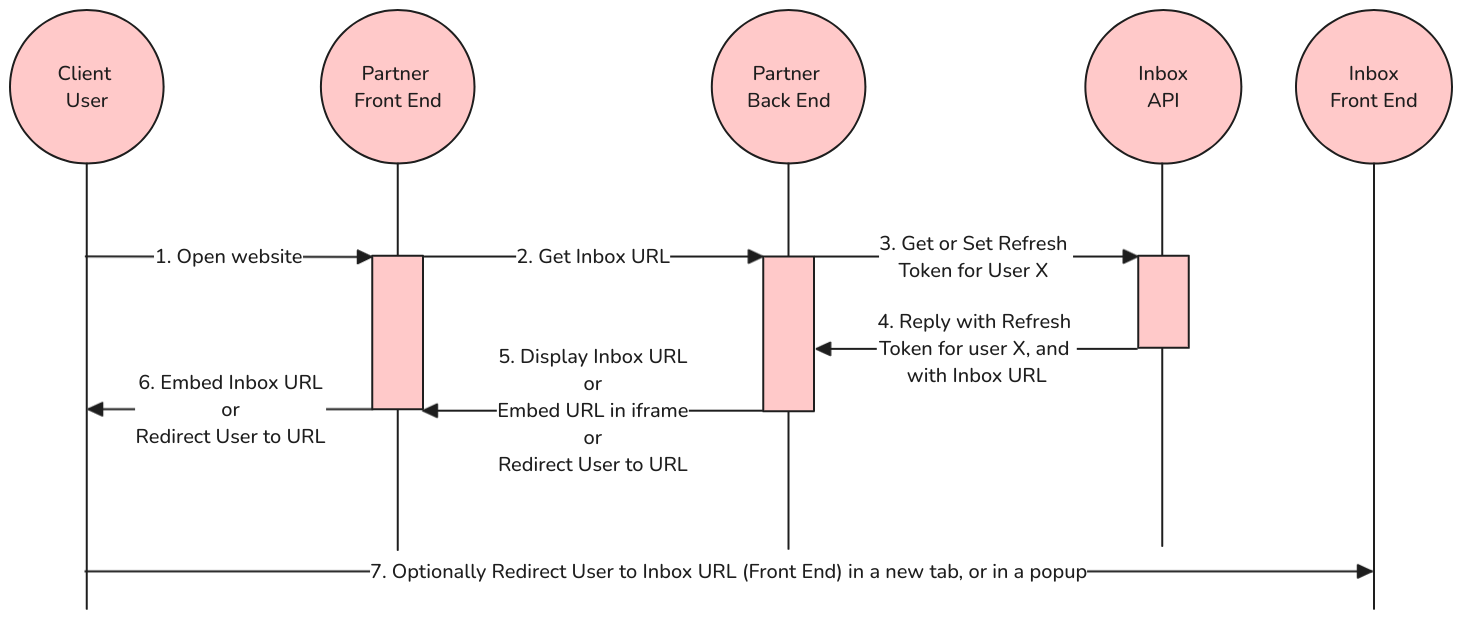
In scenarios like embedding the inbox web frontend inside an external app, a password-less authentication flow might come useful. In this flow, the end user doesn't have to provide (and remember) inbox user password, and user authentication is fully managed by the external app developed by the Partner, or app provider.
To implement that, Refresh Token can be used in a standardized password-less authentication flow:
 |
|---|
| Password-less authentication flow |
- Authentication challenge: The Client User opens the Partner's website Front End. (Arrow: 1. Open website) The Frontend sends an authentication challenge (e.g. asks for user's password) when the User tries to access the website, or the User is already authenticated on Partner Front End.
- User authentication: The user proves their identity by logging in on the Partner's Front End, or User is already authenticated. Partner Front End gets the Inbox URL for related User, from Partner Back End (Arrow: 2. Get Inbox URL).
- Challenge response: The User's authentication to the Partner app, allows to acquire an authentication to the Inbox API. Partner Back End gets the current Refresh Token (using retrieveRefreshToken endpoint) for this authenticated User, using service account (admin) credentials (Arrow: 3. Get or Set Refresh Token for User X).
- Response validation: The Inbox API uses the service account credentials and User ID to return with Refresh Token (Arrow: 4. Reply with Refresh Token for User X).
- After Inbox API call, the Inbox URL is known and is combined with acquired Refresh Token
(using
idtGET parameter). (Arrow: 5. [Display / Embed / Redirect User to] URL). For example, if API call was made tohttps://{INBOX_URL}/api/v1, then the Inbox URL should behttps://{INBOX_URL}/app?idt={REFRESH_TOKEN}. - The Inbox URL + Refresh Token is displayed to the User - either as a link or button, or embedded inside an iframe, or returned as a redirect. (Arrow: 6. [Embed / Redirect User to] URL)
- Optionally, the User is redirected to Inbox URL in a new tab or popup. (Arrow: 7. Optionally Redirect User to Inbox URL)
For proof-of-concept reasons, it is possible to implement an even simpler flow, without the dynamic communication with Inbox API needed:
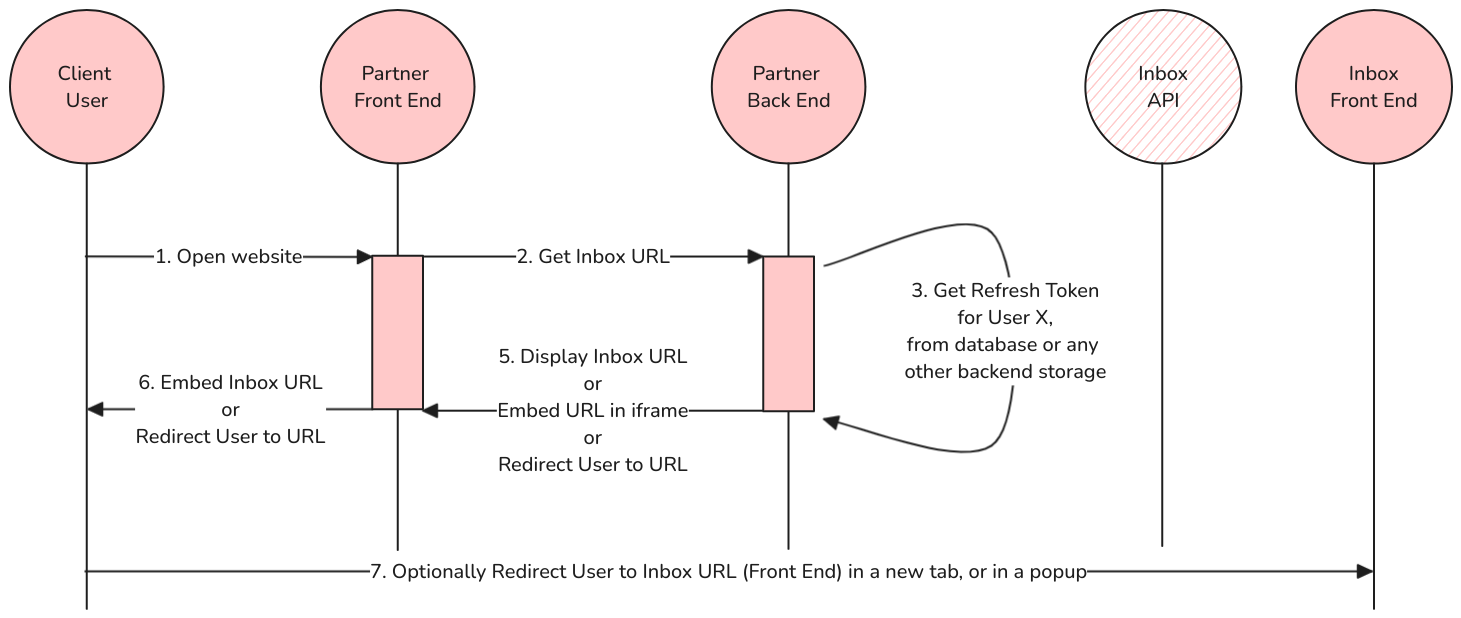 |
|---|
| Password-less authentication flow - Quick Start |
In this version, everything is the same as in the full version, except the point 3. and with point 4. removed.
In point 3., the Refresh Token value can be retrieved from a database or any other backend storage that was populated previously. For proof of concept purposes, such database entry or other storage entry could be prepared manually by a developer, or automatically via API calls in some initial process before this flow.
In other words, retrieveRefreshToken endpoint is used like in the full version of the flow, but only once - before authentication flow.
How does the Partner Back End know the Inbox API URL and credentials?
Every Inbox has its own URL, and its own API URL, that is bound to a specific inbox instance (and WhatsApp Business phone number). That being said, the relationship of Client User <-> Inbox URL must be stored somewhere in the Partner Back End before authentication flow, ideally during Client User registration process, or account creation process.
When authenticating the Client User during password-less authentication flow, Partner Back End will need to know the Inbox API URL that is unique for every WhatsApp Business phone number. In addition to URL, Partner Back End will need to authenticate itself towards API using one of the provided Authorization methods. It is recommended to use Provider method, which is suitable for Partners who are using 360dialog API Key with 360dialog API. In Provider Method, the Partner Back End will pass the 360dialog API Key to Inbox API, and Inbox API will use that Key to confirm that the Partner has valid rights to the API.
It's possible to implement Password-less authentication flow without Provider Authorization Method, and by using one of two other methods (Token, and Session), however those two methods are not recommended for password-less authentication flow, as they may make the implementation of the flow much more complex. Both Token and Session authorization methods will require to store additional credentials at Partner Back End. With Provider Authorization Method, an integration of Partner System with Inbox API is much easier to implement, as the developer doesn't have to distinguish between Inbox API credentials and 360dialog API credentials. It is also much easier to maintain, in case of resetting API credentials. When Partner (or Client) decides to reset the 360dialog API Key, Provider Method is aware of that, and will properly authenticate the Partner Back End with a new 360dialog API Key.
In step 5. of the flow, the documentation says "the Inbox URL is known" - how exactly the URL can be known?
Note that in step 3., Partner Back End is making a request to Inbox API. This request is made to an API that is exposed on an URL that is uniquely bound to a specific inbox instance (and WhatsApp Business phone number). That being said, the Client User <-> Inbox URL relationship must be stored somewhere in Partner Back End before authentication flow, ideally during Client User registration process, or account creation process. See "How does the Partner Back End know the Inbox API URL and credentials?" for more information.
In step 5., the Inbox URL is already known, because it was used in step 3. So, the Inbox URL can be re-used in steps 5., 6., and 7. without reaching out to database or storage again.
For example, if API call was made to https://{INBOX_URL}/api/v1, then the Inbox URL should be
https://{INBOX_URL}/app/?idt={REFRESH_TOKEN}.
How to handle situations when Client User changed their password?
Partner app is in a full control of password-less authentication flow. On 1st step of the flow, the Partner Front End and Partner Back End are authenticating the Client User. The Partner app (or the Partner system) has to handle the password exceptions on their own - for scenarios like password reset, forgotten password and similar.
How to prevent Client Users from logging into the Inbox (or Inbox API) with Inbox-internal username and password?
New Client Users can be created using Partner's automation with createNewUser endpoint or manually via Inbox admin panel. Both methods allow for creating a new User without any password set, which prevents from logging into the Inbox outside of Partner systems or Partner app.
In other words, when a new User is created in an Inbox without password, then it's possible to log in to this User
only via password-less authentication flow and via one-time Activation URL
(See activation_url in createNewUser endpoint documentation).
Endpoints related to Authorization
convertIdToken
Converts the Refresh Token to Auth Token.
DEPRECATED: In previous versions, this endpoint converted the ID Token to Auth Token. If you use this endpoint now, it will convert the Refresh Token to Auth Token.
You should migrate to convertRefreshToken method now, before convertIdToken is removed in future versions.
The Refresh Token is acquired during password-less authentication flow, or by a related inbox User via API: retrieveRefreshToken and can be used to authenticate Inbox User without password.
Refresh Token will be reset each time when it is converted to Auth Token.
Note that new Auth Token is created only if it does not exist (if there were no logins in the past, for this user). If the Auth Token already exists, it is returned here, and new Auth Token is not created.
For more information about Auth Token, see Token authorization.
Request Body schema:
| id_token required | string Refresh Token acquired from retrieveRefreshToken endpoint. |
Responses
Request samples
- Payload
{- "id_token": "string"
}Response samples
- 201
{- "token": "string"
}convertRefreshToken
Converts the Refresh Token to Auth Token.
The Refresh Token is acquired during password-less authentication flow, or by a related inbox User via API: retrieveRefreshToken and can be used to authenticate Inbox User without password.
Note that new Auth Token is created only if it does not exist (if there were no logins in the past, for this user). If the Auth Token already exists, it is returned here, and new Auth Token is not created.
For more information about Auth Token, see Token authorization.
Request Body schema:
| refresh_token required | string Refresh Token acquired from retrieveRefreshToken endpoint. |
| keep_refresh_token | boolean Default: false Keep Refresh Token unchanged in the API. By default (false), Refresh Token will be reset each time when it is converted to Auth Token. |
Responses
Request samples
- Payload
{- "refresh_token": "string",
- "keep_refresh_token": false
}Response samples
- 201
{- "token": "string"
}retrieveRefreshToken
Retrieves currently valid Refresh Token for given User.
As an admin User you can retrieve Refresh Token for any User. Any other User can retrieve only their own Refresh Token.
After retrieving the Refresh Token, it can be used with convertRefreshToken in order to get the Auth Token and properly authenticate the User.
Note that if you are implementing the password-less authentication flow, do not call the convertRefreshToken.
Your system or app should render the Inbox URL + Refresh Token to the Client User,
or should redirect the Client User to the Inbox URL containing Refresh Token.
To include Refresh Token inside Inbox URL, use refresh_token GET parameter.
For example, if API call was made to https://{INBOX_URL}/api/v1, then the Inbox URL should be
https://{INBOX_URL}/app/?refresh_token={REFRESH_TOKEN}.
Note that inactive Users, "app" role Users, and Configurator Users cannot retrieve (and convert) Refresh Tokens.
See the password-less authentication flow for more explanation.
Authorizations:
path Parameters
| user required | number ID of the User that we want to authenticate |
Responses
Response samples
- 200
{- "refresh_token": "string"
}setPasswordWithActivationCode
Sets the password of a newly created regular User, with the code of their activation link.
Opening the activation link of a regular ("user" role) User activates
the account and redirects to the web app, which calls this endpoint
with the code from the link. It is accepted even when an admin already
set a password, since the invitation does not tell the User what it
is. The code is consumed once a password is set; until then a rejected
password leaves it valid.
"admin" and "app" Users are not served here: their activation link
handles them itself.
Request Body schema:
| code required | string The code of the activation link, its |
| password required | string The new password. It has to pass the password validators. |
Responses
Request samples
- Payload
{- "code": "string",
- "password": "string"
}Response samples
- 201
{- "username": "string"
}createAuthToken
Creates the Auth Token for provided username and password.
Note that new Auth Token is created only if it does not exist (if there were no logins in the past, for this user). If the Auth Token already exists, it is returned here, and new Auth Token is not created.
See Token authorization,
Request Body schema:
| username required | string |
| password required | string |
Responses
Request samples
- Payload
Response samples
- 200
{- "token": "string"
}retrieveSessionAuthToken
Returns the Auth Token of the User authenticated by the current session.
This endpoint accepts only Django session authentication (cookies). It allows a browser that is already logged in (via the admin panel or "Login with 360dialog" SSO) to retrieve the Auth Token for API access without re-entering credentials.
Note that new Auth Token is created only if it does not exist (if there were no logins in the past, for this user). If the Auth Token already exists, it is returned here, and new Auth Token is not created.
Responses
Response samples
- 200
{- "token": "string"
}loginWithAuthxToken
Logging in with an authx token instead of Django username + password
Authorizations:
Request Body schema:
| authx_token required | string Token returned by 360dialog Hub authx API's token endpoint (requires a cookie obtained by requesting the login endpoint in the same API) |
| next | string URL to redirect to after login. Must be a relative URL or point to this Inbox, INBOX_FRONTEND_URL or INBOX_SSO_ALLOWED_REDIRECT_URLS, otherwise it is replaced with "/". |
| append_refresh_token | boolean Default: false Append the Refresh Token of the logged in User to "next" as a refresh_token query parameter and return it as JSON ({"next": ...}) instead of redirecting. Used by the "Login with 360dialog" flow of the web app frontend, which can then log in without a session even when it is deployed on another origin. |
Responses
Request samples
- Payload
{- "authx_token": "string",
- "next": "string",
- "append_refresh_token": false
}Response samples
- 200
{- "next": "string"
}tokenFromAuthx
Exchanges a 360dialog authx access token for a get.chat inbox credential.
Authenticate by providing the 360dialog authx access token as
Authorization: Bearer <token>. The token is validated against the
360dialog Hub and must belong to this Inbox's client or partner.
Depending on artifact, returns either a Refresh Token (for browser
flows that open the Inbox as /app/?refresh_token=<refresh_token>) or an Auth
Token (for server-side API callers). Note that the Refresh Token is
reset each time it is converted to an Auth Token, so browser and
server-side consumers must each request their own artifact.
Like the "Login with 360dialog" SSO flow, an admin User is created on first contact if no User matches the profile's email. No session is created by this endpoint.
Authorizations:
Request Body schema:
| artifact required | string Enum: "refresh_token" "auth_token" Which credential to return: "refresh_token" for browser flows (open the Inbox as
|
Responses
Request samples
- Payload
{- "artifact": "refresh_token"
}Response samples
- 200
{- "refresh_token": "string",
- "auth_token": "string",
- "inbox_url": "string"
}listWhatsAppAccounts
Limits a viewset to rows owned by the request's tenant (MT 2.1).
Hooks filter_queryset rather than get_queryset on purpose. Most of
these viewsets already define get_queryset to apply the can_read_chats
permission filter, and a mixin method of the same name would simply lose
the MRO to the subclass's own — silently, with no scoping applied and no
error to notice. filter_queryset is called by DRF on the result of
get_queryset() for list actions and by get_object() for detail
actions, so hooking it covers both directions no matter what the subclass
overrides.
Custom actions that resolve rows outside the queryset (a bespoke
Contact.objects.get(wa_id=...), say) are NOT covered — the queryset is
never consulted there. Those are scoped at their call site.
tenant_field is the lookup path from this viewset's model to Tenant,
for the models that do not carry the FK directly (User holds it on its
profile).
Authorizations:
query Parameters
| limit | integer Number of results to return per page. |
| offset | integer The initial index from which to return the results. |
| this_instance | boolean |
Responses
Response samples
- 200
{- "count": 123,
- "results": [
- {
- "phone_number": "string",
- "this_instance": true
}
]
}createReceivedMessageMark
Create a new mark, marking messages as received.
Every new message will be provided via /chats/ endpoint.
In order to no longer receive these messages via above endpoint, you need to mark them as received.
You can parse /messages/ endpoint object field received
to determine if a given message still needs to be marked as received.
By POSTing data to this endpoint, you create (or update) a mark of timestamp in relation to a conversation
with a contact of given customer_wa_id.
Recommended usage
It is recommended to
- use WABA Webhooks
- or to POST to this endpoint whenever you receive a batch of messages using
/messages/endpoint and you confirmed the message was received by the user.
Forwarding messages to your system
If you develop some kind of integration of data between systems or simply bridge these messages to other systems,
received message mark is useful for determining which Chats have new messages.
By using /chats/ endpoint you can quickly determine which contacts
have new, unreceived messages. But to keep this endpoint up to date, you need to create received message marks.
Instant mark
Messages propagated to a User via WABA Webhook successfully (200 OK status code) are automatically marked as received by related User.
It is also possible to mark messages as received "instantly" when polling them via our API directly.
In such case you should use mark_as_received parameter of /messages/ endpoint.
If you use mentioned mark_as_received parameter or you
configured a WABA Webhook,
usage of the /mark_as_received/ endpoint described here is no longer needed.
Authorizations:
Request Body schema:
| timestamp required | integer A timestamp of the latest message that was received by the User calling this API. This API cannot mark messages as received for timestamps that are in the future. The message must be first stored in the Inbox in order to mark it as received in the Inbox and then mark as read in WhatsApp. Make sure to not use current timestamp from your local clock as it might be off with the Inbox server clock. The best idea is to use only timestamps from incoming message payload. Only then you can avoid race conditions of marking messages as received while not (yet) receiving them. |
| customer_wa_id required | string WhatsApp ID of the message sender |
Responses
Request samples
- Payload
{- "timestamp": 0,
- "customer_wa_id": "string"
}Response samples
- 452
- 453
{- "reason": "Field timestamp value is too far in the future.\n\n This API cannot mark messages as received for timestamps that are in the future.\n The message must be first stored in the Inbox in order to mark it as received in the Inbox\n and then mark as read in WhatsApp.\n Make sure to not use current timestamp from your local clock as it might be off with the Inbox server clock.\n The best idea is to use only timestamps from incoming message payload.\n Only then you can avoid race conditions of marking messages as received while not (yet) receiving them.",
- "timestamp": 1230796536,
- "server_timestamp": 1230796535
}listMessages
A wrapper of messages object of
Inbound Notifications from WhatsApp Business API
(WABA Stack).
This object field waba_payload contains exactly the same data as specified in WhatsApp Business API.
This endpoint is useful for loading messages into a view. Example use cases:
- Message view is loaded for the first time
- Contact message history is loaded or is scrolled
To get the number of new messages for all contacts, see chats endpoint.
Messages are ordered from newest to oldest.
Recommended usage
You can use limit and offset query parameters to access each page, but it is often advised to use before_time
instead of offset.
For example, if you only need to get most recent 20 messages, you will use:
/api/v1/messages/?limit=20
But if you need to read the history of 20 messages before, you should use before_time equal to the timestamp
of the last (20th) message you got before:
/api/v1/messages/?limit=20&before_time=1234567890
As a result, you will get up to 20 messages that were sent before previous 20 messages.
Using before_time instead of offset is advised because it is possible you will get new messages when you browse
your paginated history of messages. Since messages are ordered from newest to oldest, offset based pagination
is changing each time you receive a new message from a contact. Using before_time solves this problem.
Authorizations:
query Parameters
| assigned_group | integer Filter only Messages of Chats assigned to specified Group. Skip this param to display all messages currently logged in User has access to. Param value is an integer identifier of the Group. Only Groups the User is member of can be used. |
| assigned_to_me | boolean Filter only Messages of Chats assigned to currently logged in User.
Skip this param or leave default |
| before_time | integer POSIX timestamp.
Returns only messages that are older than specified This should be used when implementing scroll of the messages from newest to oldest. |
| chat_tag_id | integer Filter only Messages of Chats having given tag ID. |
| from_us | boolean Filter only Messages that are either from us (inbox users and automation) or not. |
| limit | integer Number of results to return per page. |
| mark_as_received | integer Mark all returned messages as received by you (logged in user). You need to use either this param or POST to
|
| offset | integer The initial index from which to return the results. |
| search | string Filter Messages by string query - search for messages containing specified text phrase. The API will search in following places:
|
| since_time | integer POSIX timestamp.
Returns only messages that are at the same timestamp or newer than specified This should be used when implementing scroll of the messages from oldest to newest. |
| wa_id | string WhatsApp id of related contact |
Responses
Response samples
- 200
- 425
{- "count": 123,
- "results": [
- {
- "count": 1,
- "next": null,
- "previous": null,
- "results": [
- {
- "id": "76b47063-3ddd-491e-8151-cdaf1c2b73b2",
- "waba_payload": {
- "wa_id": "48123123123",
- "to": "48123123123",
- "type": "text",
- "text": {
- "body": "Hello :)"
}, - "id": "gBGGSFEBeRJ_AgnJkfda1iRwQteM",
- "timestamp": "1611319126"
}, - "waba_statuses": {
- "sent": null,
- "delivered": null,
- "read": null
}, - "contact": {
- "wa_id": "48123123123",
- "waba_payload": {
- "profile": {
- "name": "Konrad"
}, - "wa_id": "48123123123"
}, - "initials": "K",
- "last_message_timestamp": 1685296667
}, - "customer_wa_id": "48123123123",
- "from_us": false,
- "received": true,
- "sender": {
- "id": 1,
- "username": "konrad",
- "first_name": "Konrad",
- "last_name": "Rabbit",
- "email": "rabbit@example.com",
- "profile": {
- "role": "admin"
}, - "groups": [
- {
- "id": 2,
- "name": "Admin"
}
], - "permissions": {
- "can_use_tags": true,
- "can_read_chats": "all",
- "can_write_to_chats": "all"
}
}
}
]
}
]
}createMessage
Create a new message
This object contains selected data that is following specification of WhatsApp Business API.
The type field determines the type of message. Choosing one of possible types makes related field required.
For example, choosing "type": "text" makes field text required.
If the recipient does not have WhatsApp, the resulting WhatsApp Business API error (WhatsApp Business API Client Error Code 470) will be forwarded to you asynchronously using another channel (e.g. websocket).
Authorizations:
Request Body schema:
| type required | string (CreateMessageTypeEnum) Enum: "text" "image" "contacts" "document" "hsm" "location" "sticker" "template" "audio" "video" "interactive" "reaction"
|
| verify_contact | boolean or null Default: false Deprecated parameter: Will be treated as false regardless of value, as contact verification has been removed from WhatsApp side. See endpoint description. It has been updated to reflect the new workflow. |
object (MessageText) | |
object (CaptionedMedia) A media object that has Used in | |
| contacts | |
object (MessageDocument) A media object that has Used in | |
| hsm | any Deprecated: The |
| location | |
object (MessageSticker) | |
| template | |
object (MessageMedia) Media file common fields
We're not using Business API's Optionally we take | |
object (CaptionedMedia) A media object that has Used in | |
| interactive | |
object (MessageReaction) | |
| wa_id required | string^([A-Z]{2}\.(ENT\.)?[a-zA-Z0-9]+|[0-9]+)$ WhatsApp ID of the message recipient — either a phone number in canonical form (e.g. 48123123123) or a Business-Scoped User ID (e.g. US.13491208655302741918). |
Responses
Request samples
- Payload
{- "wa_id": "48123123123",
- "type": "text",
- "text": {
- "body": "Hello!"
}
}Response samples
- 202
- 400
- 403
- 423
- 452
- 453
- 503
{- "reason": "Message is saved and will be sent as soon as other messages currently pending for this user are delivered.",
- "id": "8b176ba5-fa8e-458e-94ad-85d1ae8f3be0"
}retrieveMessage
Limits a viewset to rows owned by the request's tenant (MT 2.1).
Hooks filter_queryset rather than get_queryset on purpose. Most of
these viewsets already define get_queryset to apply the can_read_chats
permission filter, and a mixin method of the same name would simply lose
the MRO to the subclass's own — silently, with no scoping applied and no
error to notice. filter_queryset is called by DRF on the result of
get_queryset() for list actions and by get_object() for detail
actions, so hooking it covers both directions no matter what the subclass
overrides.
Custom actions that resolve rows outside the queryset (a bespoke
Contact.objects.get(wa_id=...), say) are NOT covered — the queryset is
never consulted there. Those are scoped at their call site.
tenant_field is the lookup path from this viewset's model to Tenant,
for the models that do not carry the FK directly (User holds it on its
profile).
Authorizations:
path Parameters
| id required | string A unique value identifying this message. |
Responses
Response samples
- 200
{- "id": "string",
- "waba_payload": null,
- "waba_statuses": {
- "sent": 0,
- "delivered": 0,
- "read": 0
}, - "contact": {
- "wa_id": "string",
- "bsuid": "string",
- "phone_number": "string",
- "waba_payload": {
- "profile": {
- "name": "string"
}, - "wa_id": "string"
}, - "initials": "string",
- "last_message_timestamp": 0,
- "messaging_window_expires_at": 0,
- "messaging_window_origin": "string",
- "resolved": true
}, - "from_us": true,
- "received": false,
- "sender": {
- "id": 0,
- "username": "string",
- "first_name": "string",
- "last_name": "string",
- "email": "user@example.com",
- "profile": {
- "role": "user",
- "is_available": true
}, - "groups": [
- {
- "id": 0,
- "name": "string"
}
], - "permissions": {
- "can_use_tags": true,
- "can_read_chats": "all",
- "can_write_to_chats": "all"
}, - "assigned_wa_ids": [
- "string"
]
}, - "before_time": 0,
- "since_time": 0,
- "customer_wa_id": "string",
- "tags": [ ],
- "chat_tags": [ ],
- "sent_by_mba": true
}listPeople
Filter Persons by string query - search for Persons containing specified text phrase.
The API will search in following places:
waba_payload.wa_idwaba_payload.profile.name
Authorizations:
query Parameters
| limit | integer |
| offset | integer |
| search | string |
Responses
Response samples
- 200
{- "count": 123,
- "results": [
- {
- "wa_id": "string",
- "bsuid": "string",
- "phone_number": "string",
- "waba_payload": {
- "profile": {
- "name": "string"
}, - "wa_id": "string"
}, - "initials": "string",
- "last_message_timestamp": 0,
- "messaging_window_expires_at": 0,
- "messaging_window_origin": "string",
- "resolved": true
}
]
}Response samples
- 200
{- "wa_id": "string",
- "bsuid": "string",
- "phone_number": "string",
- "waba_payload": {
- "profile": {
- "name": "string"
}, - "wa_id": "string"
}, - "initials": "string",
- "last_message_timestamp": 0,
- "messaging_window_expires_at": 0,
- "messaging_window_origin": "string",
- "resolved": true
}WhatsApp Users' contact details
get.chat WhatsApp Inbox does not keep or manage your contacts. Instead, you can connect your existing contact books or databases, using Contact Providers.
When one or more Contact Providers are successfully connected to your inbox, you will be able to request related contact data from endpoints described here.
In the /contacts/ section, there are also WhatsApp Business API provided endpoints like: verifying the Contact, blocking WhatsApp number, reporting WhatsApp user to Meta.
listContacts
Limits a viewset to rows owned by the request's tenant (MT 2.1).
Hooks filter_queryset rather than get_queryset on purpose. Most of
these viewsets already define get_queryset to apply the can_read_chats
permission filter, and a mixin method of the same name would simply lose
the MRO to the subclass's own — silently, with no scoping applied and no
error to notice. filter_queryset is called by DRF on the result of
get_queryset() for list actions and by get_object() for detail
actions, so hooking it covers both directions no matter what the subclass
overrides.
Custom actions that resolve rows outside the queryset (a bespoke
Contact.objects.get(wa_id=...), say) are NOT covered — the queryset is
never consulted there. Those are scoped at their call site.
tenant_field is the lookup path from this viewset's model to Tenant,
for the models that do not carry the FK directly (User holds it on its
profile).
Authorizations:
query Parameters
| limit | integer Number of results to return per page. |
| offset | integer The initial index from which to return the results. |
| search | string Filter Contacts by string query. Searching is expensive, so when implementing this functionality on the frontend, make sure the user really finished typing the search query before calling this endpoint. |
Responses
Response samples
- 200
{- "count": 123,
- "results": [
- {
- "name": "string",
- "initials": "string",
- "phone_numbers": [
- {
- "phone_number": "string"
}
], - "email_addresses": [
- null
], - "urls": [
- null
], - "contact_provider": null
}
]
}contactDetails
Retrieves Contact details. You should try to use this endpoint as little as possible, for example:
- when a detailed view of one Person is displayed
Authorizations:
path Parameters
| wa_id required | string^[^/]+$ |
Responses
Response samples
- 200
{- "person": {
- "wa_id": "string",
- "bsuid": "string",
- "phone_number": "string",
- "waba_payload": {
- "profile": {
- "name": "string"
}, - "wa_id": "string"
}, - "initials": "string",
- "last_message_timestamp": 0,
- "messaging_window_expires_at": 0,
- "messaging_window_origin": "string",
- "resolved": true
}, - "contact_provider_results": [
- {
- "name": "string",
- "initials": "string",
- "phone_numbers": [
- {
- "phone_number": "string",
- "description": "string"
}
], - "email_addresses": [
- {
- "email_address": "user@example.com",
- "description": "string"
}
], - "contact_provider": {
- "type": "google",
- "name": "string",
- "id": "497f6eca-6276-4993-bfeb-53cbbbba6f08"
}
}
]
}blockContact
Block contacts due to spam and abuse of WhatsApp. To block a contact they had to have sent you a message in the last 24 hours.
Authorizations:
path Parameters
| wa_id required | string^[^/]+$ |
query Parameters
| wa_id required | string Phone number which needs to be blocked. |
Request Body schema:
| reason | string <= 60 characters Default: "" Optional string with max length 60. Free form block reason. Will be used when another business account is being blocked. |
Responses
Request samples
- Payload
{- "reason": ""
}Response samples
- 400
{- "meta": {
- "api_status": "stable",
- "version": "2.45.1"
}, - "errors": [
- {
- "code": 2048,
- "title": "Not engaged contact",
- "details": "Invalid Request. This contact hasn't engaged with you in the last 24 hrs."
}
]
}reportContact
Report contacts due to spam and abuse of WhatsApp. Before reporting a contact, they had to have sent you a message in the last 24 hours.
Authorizations:
path Parameters
| wa_id required | string^[^/]+$ |
query Parameters
| wa_id | string Phone number which needs to be blocked. |
Request Body schema:
| reason | string <= 60 characters Default: "" Optional string with max length 60. Free form block reason. Will be used when another business account is being blocked. |
| block | boolean Default: false True or false optional boolean with default of false |
| message_id | string Optional reported message id |
Responses
Request samples
- Payload
{- "reason": "",
- "block": false,
- "message_id": "string"
}Response samples
- 400
{- "meta": {
- "api_status": "stable",
- "version": "2.45.1"
}, - "errors": [
- {
- "code": 2048,
- "title": "Not engaged contact",
- "details": "Invalid Request. This contact hasn't engaged with you in the last 24 hrs."
}
]
}unblockContact
Unblock contacts which were blocked or reported to block previously.
Authorizations:
path Parameters
| wa_id required | string^[^/]+$ |
query Parameters
| wa_id required | string Phone number which needs to be blocked. |
Request Body schema:
| reason | string <= 60 characters Default: "" Optional string with max length 60. Free form block reason. Will be used when another business account is being blocked. |
Responses
Request samples
- Payload
{- "reason": ""
}Response samples
- 400
{- "meta": {
- "api_status": "stable",
- "version": "2.45.1"
}, - "errors": [
- {
- "code": 1009,
- "title": "Parameter value is not valid",
- "details": "Provided WhatsApp ID is not valid. Please provide a valid WhatsApp ID or a phone number with a country code"
}
]
}listBlockedContacts
View blocked contacts list. These phone numbers are blocked by the user due to spam and abuse of WhatsApp.
Authorizations:
query Parameters
| limit | integer Number of results to return per page. |
| offset | integer The initial index from which to return the results. |
| phone_number | string Phone number which needs to be blocked. |
Responses
Response samples
- 200
{- "contacts": [
- {
- "wa_id": "16315551000@s.whatsapp.net"
}
], - "pagination": {
- "limit": 10,
- "offset": 0,
- "total": 1
}
}createChatImport
Import an existing WhatsApp chat generated by the "Export chat" action in the WhatsApp Business app.
Use this endpoint to upload the chat and all media files. Requires some preparation work to be done in the app that served as export target for WhatApp.
Parameters you supply such as contacts, UTC offset must come from the device you exported the WhatsApp chat on.
Authorizations:
Request Body schema:
| chat_text required | string The text chat log as given to you by WhatsApp |
Array of objects (ChatImportContact) Required if chat partner is in the device's contacts, supply chat partner's phone number with this. If you cannot tell which contact is incoming and which is outgoing, supply both. Do not supply more than two contacts. | |
| utc_offset_minutes required | integer The device may have had a non-UTC time zone; supply the number of minutes that time zone is ahead of UTC. Supply a negative number if you are in the Americas |
| device_language_code required | string Locale code of device's system language, and optionally, country |
required | Array of objects (ChatImportMediaFile) |
Responses
Request samples
- Payload
{- "chat_text": "10/03/2022, 11:00 - Customer 1: Message 1\n10/03/2022, 11:00 - Customer 1: Message 2 Line 1\nMessage 2 Line 2",
- "chat_participants": [
- {
- "handle": "Customer 1",
- "phone_number": "+00 000 00000000"
}
], - "utc_offset_minutes": -420,
- "device_language_code": "en-US",
- "media_files": [
- {
- "b64_content": "AA==",
- "mime_type": "image/jpg",
- "file_name": "IMG-20220310-WA0000.jpg"
}
]
}Response samples
- 201
{- "contact": {
- "wa_id": "string",
- "bsuid": "string",
- "phone_number": "string",
- "waba_payload": {
- "profile": {
- "name": "string"
}, - "wa_id": "string"
}, - "initials": "string",
- "last_message_timestamp": 0,
- "messaging_window_expires_at": 0,
- "messaging_window_origin": "string",
- "resolved": true
}, - "new_messages": 0,
- "wa_id": "string",
- "bsuid": "string",
- "phone_number": "string",
- "last_message": {
- "id": "string",
- "waba_payload": null,
- "waba_statuses": {
- "sent": 0,
- "delivered": 0,
- "read": 0
}, - "contact": {
- "wa_id": "string",
- "bsuid": "string",
- "phone_number": "string",
- "waba_payload": {
- "profile": {
- "name": "string"
}, - "wa_id": "string"
}, - "initials": "string",
- "last_message_timestamp": 0,
- "messaging_window_expires_at": 0,
- "messaging_window_origin": "string",
- "resolved": true
}, - "from_us": true,
- "received": false,
- "sender": {
- "id": 0,
- "username": "string",
- "first_name": "string",
- "last_name": "string",
- "email": "user@example.com",
- "profile": {
- "role": "user",
- "is_available": true
}, - "groups": [
- {
- "id": 0,
- "name": "string"
}
], - "permissions": {
- "can_use_tags": true,
- "can_read_chats": "all",
- "can_write_to_chats": "all"
}, - "assigned_wa_ids": [
- "string"
]
}, - "before_time": 0,
- "since_time": 0,
- "customer_wa_id": "string",
- "tags": [ ],
- "chat_tags": [ ],
- "sent_by_mba": true
}, - "assigned_to_user": {
- "id": 0,
- "username": "string",
- "first_name": "string",
- "last_name": "string",
- "email": "user@example.com",
- "profile": {
- "role": "user",
- "is_available": true
}, - "groups": [
- {
- "id": 0,
- "name": "string"
}
], - "permissions": {
- "can_use_tags": true,
- "can_read_chats": "all",
- "can_write_to_chats": "all"
}, - "assigned_wa_ids": [
- "string"
]
}, - "assigned_group": {
- "id": 0,
- "name": "string"
}, - "tags": [
- {
- "name": "string",
- "web_inbox_color": "string",
- "tagging_id": 0,
- "id": 0,
- "extra": null
}
], - "thread_controller": "mba"
}listChats
Get existing chats and the number of new messages in each chat.
This endpoint is similar to /persons/ endpoint - here also contacts are listed, but only these contacts for which conversation already exists.
Chats are sorted by last_message_timestamp, newest to oldest.
To mark these messages as received, first store wa_id (WhatsApp ID) field value of this endpoint.
Then use messages endpoint to read messages for related contact and
store the message id. After making sure the user has received the message on the frontend,
check the timestamp of the most recent message received and use it with
/mark_as_received/ endpoint to actually mark it as received.
Marking messages as received is important to prevent duplicate notifications.
Response is paginated.
Use limit and offset query parameters to access each page.
Query parameter limit default value is 100.
JSON response body field count tells the total number of elements available on all pages.
Authorizations:
query Parameters
| assigned_group | integer Filter only Chats assigned to specified Group. Skip this param to display all messages currently logged in User has access to. Param value is an integer identifier of the Group. Only Groups the User is member of can be used. |
| assigned_to_me | boolean Filter only Chats assigned to currently logged in User.
Skip this param or leave default |
| blocked | boolean Filter only Chats which are blocked due to spam and abuse of WhatsApp. |
| chat_tag_id | integer Filter only Chats having given tag ID. |
| limit | integer Number of results to return per page. |
| message_has_referral | boolean When set to |
| message_referral_body | string Filter only Chats that had a Message with |
| message_referral_headline | string Filter only Chats that had a Message with |
| message_referral_media_type | string Filter only Chats that had a Message with |
| message_referral_source_id | string Filter only Chats that had a Message with |
| message_referral_source_type | string Filter only Chats that had a Message with |
| message_referral_source_url | string Filter only Chats that had a Message with |
| messages_before_time | integer POSIX timestamp. Returns only Chats containing Messages that are older than specified value. |
| messages_since_time | integer POSIX timestamp. Returns only Chats containing Messages at the same timestamp or newer than specified value. |
| offset | integer The initial index from which to return the results. |
| reported | boolean Filter only Chats which are reported due to spam and abuse of WhatsApp. |
| search | string Filter Chats by string query - search for chats containing specified text phrase. The API will search in following places:
|
| unread | boolean Filter only Chats that have unread messages. |
Responses
Response samples
- 200
{- "count": 123,
- "results": [
- {
- "contact": {
- "wa_id": "string",
- "bsuid": "string",
- "phone_number": "string",
- "waba_payload": {
- "profile": {
- "name": "string"
}, - "wa_id": "string"
}, - "initials": "string",
- "last_message_timestamp": 0,
- "messaging_window_expires_at": 0,
- "messaging_window_origin": "string",
- "resolved": true
}, - "new_messages": 0,
- "wa_id": "string",
- "bsuid": "string",
- "phone_number": "string",
- "last_message": {
- "id": "string",
- "waba_payload": null,
- "waba_statuses": {
- "sent": 0,
- "delivered": 0,
- "read": 0
}, - "contact": {
- "wa_id": "string",
- "bsuid": "string",
- "phone_number": "string",
- "waba_payload": {
- "profile": {
- "name": "string"
}, - "wa_id": "string"
}, - "initials": "string",
- "last_message_timestamp": 0,
- "messaging_window_expires_at": 0,
- "messaging_window_origin": "string",
- "resolved": true
}, - "from_us": true,
- "received": false,
- "sender": {
- "id": 0,
- "username": "string",
- "first_name": "string",
- "last_name": "string",
- "email": "user@example.com",
- "profile": {
- "role": "user",
- "is_available": true
}, - "groups": [
- {
- "id": 0,
- "name": "string"
}
], - "permissions": {
- "can_use_tags": true,
- "can_read_chats": "all",
- "can_write_to_chats": "all"
}, - "assigned_wa_ids": [
- "string"
]
}, - "before_time": 0,
- "since_time": 0,
- "customer_wa_id": "string",
- "tags": [ ],
- "chat_tags": [ ],
- "sent_by_mba": true
}, - "assigned_to_user": {
- "id": 0,
- "username": "string",
- "first_name": "string",
- "last_name": "string",
- "email": "user@example.com",
- "profile": {
- "role": "user",
- "is_available": true
}, - "groups": [
- {
- "id": 0,
- "name": "string"
}
], - "permissions": {
- "can_use_tags": true,
- "can_read_chats": "all",
- "can_write_to_chats": "all"
}, - "assigned_wa_ids": [
- "string"
]
}, - "assigned_group": {
- "id": 0,
- "name": "string"
}, - "tags": [
- {
- "name": "string",
- "web_inbox_color": "string",
- "tagging_id": 0,
- "id": 0,
- "extra": null
}
], - "thread_controller": "mba"
}
]
}retrieveChat
Limits a viewset to rows owned by the request's tenant (MT 2.1).
Hooks filter_queryset rather than get_queryset on purpose. Most of
these viewsets already define get_queryset to apply the can_read_chats
permission filter, and a mixin method of the same name would simply lose
the MRO to the subclass's own — silently, with no scoping applied and no
error to notice. filter_queryset is called by DRF on the result of
get_queryset() for list actions and by get_object() for detail
actions, so hooking it covers both directions no matter what the subclass
overrides.
Custom actions that resolve rows outside the queryset (a bespoke
Contact.objects.get(wa_id=...), say) are NOT covered — the queryset is
never consulted there. Those are scoped at their call site.
tenant_field is the lookup path from this viewset's model to Tenant,
for the models that do not carry the FK directly (User holds it on its
profile).
Authorizations:
path Parameters
| wa_id required | string^[^/]+$ |
Responses
Response samples
- 200
{- "contact": {
- "wa_id": "string",
- "bsuid": "string",
- "phone_number": "string",
- "waba_payload": {
- "profile": {
- "name": "string"
}, - "wa_id": "string"
}, - "initials": "string",
- "last_message_timestamp": 0,
- "messaging_window_expires_at": 0,
- "messaging_window_origin": "string",
- "resolved": true
}, - "new_messages": 0,
- "wa_id": "string",
- "bsuid": "string",
- "phone_number": "string",
- "last_message": {
- "id": "string",
- "waba_payload": null,
- "waba_statuses": {
- "sent": 0,
- "delivered": 0,
- "read": 0
}, - "contact": {
- "wa_id": "string",
- "bsuid": "string",
- "phone_number": "string",
- "waba_payload": {
- "profile": {
- "name": "string"
}, - "wa_id": "string"
}, - "initials": "string",
- "last_message_timestamp": 0,
- "messaging_window_expires_at": 0,
- "messaging_window_origin": "string",
- "resolved": true
}, - "from_us": true,
- "received": false,
- "sender": {
- "id": 0,
- "username": "string",
- "first_name": "string",
- "last_name": "string",
- "email": "user@example.com",
- "profile": {
- "role": "user",
- "is_available": true
}, - "groups": [
- {
- "id": 0,
- "name": "string"
}
], - "permissions": {
- "can_use_tags": true,
- "can_read_chats": "all",
- "can_write_to_chats": "all"
}, - "assigned_wa_ids": [
- "string"
]
}, - "before_time": 0,
- "since_time": 0,
- "customer_wa_id": "string",
- "tags": [ ],
- "chat_tags": [ ],
- "sent_by_mba": true
}, - "assigned_to_user": {
- "id": 0,
- "username": "string",
- "first_name": "string",
- "last_name": "string",
- "email": "user@example.com",
- "profile": {
- "role": "user",
- "is_available": true
}, - "groups": [
- {
- "id": 0,
- "name": "string"
}
], - "permissions": {
- "can_use_tags": true,
- "can_read_chats": "all",
- "can_write_to_chats": "all"
}, - "assigned_wa_ids": [
- "string"
]
}, - "assigned_group": {
- "id": 0,
- "name": "string"
}, - "tags": [
- {
- "name": "string",
- "web_inbox_color": "string",
- "tagging_id": 0,
- "id": 0,
- "extra": null
}
], - "thread_controller": "mba"
}handoverChat
Hands control of this conversation back to Meta Business Agent.
The reverse direction needs no endpoint: the inbox takes control of a conversation simply by sending a message to it.
Authorizations:
path Parameters
| wa_id required | string^[^/]+$ |
Request Body schema:
required | object Who are we talking to |
| new_messages required | integer The number of messages not received by currently authenticated user |
| wa_id required | string Deprecated |
required | object (RetrieveMessage) |
required | object (User) |
required | object (Group) |
required | Array of objects (Tagging) |
Responses
Request samples
- Payload
{- "contact": {
- "wa_id": "string",
- "waba_payload": {
- "profile": {
- "name": "string"
}, - "wa_id": "string"
}, - "initials": "string",
- "last_message_timestamp": 0,
- "resolved": true
}, - "new_messages": 0,
- "wa_id": "string",
- "last_message": {
- "id": "string",
- "waba_payload": null,
- "waba_statuses": {
- "sent": 0,
- "delivered": 0,
- "read": 0
}, - "contact": {
- "wa_id": "string",
- "waba_payload": {
- "profile": {
- "name": "string"
}, - "wa_id": "string"
}, - "initials": "string",
- "last_message_timestamp": 0,
- "resolved": true
}, - "received": false,
- "sender": {
- "username": "string",
- "first_name": "string",
- "last_name": "string",
- "email": "user@example.com",
- "profile": {
- "role": "user",
- "is_available": true
}, - "group_ids": [
- 0
], - "permissions": {
- "can_use_tags": true,
- "can_read_chats": "all",
- "can_write_to_chats": "all"
}
}, - "before_time": 0,
- "since_time": 0,
- "tags": [ ],
- "chat_tags": [ ]
}, - "assigned_to_user": {
- "username": "string",
- "first_name": "string",
- "last_name": "string",
- "email": "user@example.com",
- "profile": {
- "role": "user",
- "is_available": true
}, - "group_ids": [
- 0
], - "permissions": {
- "can_use_tags": true,
- "can_read_chats": "all",
- "can_write_to_chats": "all"
}
}, - "assigned_group": {
- "name": "string"
}, - "tags": [
- {
- "name": "string",
- "web_inbox_color": "string",
- "id": 0,
- "extra": null
}
], - "thread_controller": "mba"
}Response samples
- 200
{- "contact": {
- "wa_id": "string",
- "bsuid": "string",
- "phone_number": "string",
- "waba_payload": {
- "profile": {
- "name": "string"
}, - "wa_id": "string"
}, - "initials": "string",
- "last_message_timestamp": 0,
- "messaging_window_expires_at": 0,
- "messaging_window_origin": "string",
- "resolved": true
}, - "new_messages": 0,
- "wa_id": "string",
- "bsuid": "string",
- "phone_number": "string",
- "last_message": {
- "id": "string",
- "waba_payload": null,
- "waba_statuses": {
- "sent": 0,
- "delivered": 0,
- "read": 0
}, - "contact": {
- "wa_id": "string",
- "bsuid": "string",
- "phone_number": "string",
- "waba_payload": {
- "profile": {
- "name": "string"
}, - "wa_id": "string"
}, - "initials": "string",
- "last_message_timestamp": 0,
- "messaging_window_expires_at": 0,
- "messaging_window_origin": "string",
- "resolved": true
}, - "from_us": true,
- "received": false,
- "sender": {
- "id": 0,
- "username": "string",
- "first_name": "string",
- "last_name": "string",
- "email": "user@example.com",
- "profile": {
- "role": "user",
- "is_available": true
}, - "groups": [
- {
- "id": 0,
- "name": "string"
}
], - "permissions": {
- "can_use_tags": true,
- "can_read_chats": "all",
- "can_write_to_chats": "all"
}, - "assigned_wa_ids": [
- "string"
]
}, - "before_time": 0,
- "since_time": 0,
- "customer_wa_id": "string",
- "tags": [ ],
- "chat_tags": [ ],
- "sent_by_mba": true
}, - "assigned_to_user": {
- "id": 0,
- "username": "string",
- "first_name": "string",
- "last_name": "string",
- "email": "user@example.com",
- "profile": {
- "role": "user",
- "is_available": true
}, - "groups": [
- {
- "id": 0,
- "name": "string"
}
], - "permissions": {
- "can_use_tags": true,
- "can_read_chats": "all",
- "can_write_to_chats": "all"
}, - "assigned_wa_ids": [
- "string"
]
}, - "assigned_group": {
- "id": 0,
- "name": "string"
}, - "tags": [
- {
- "name": "string",
- "web_inbox_color": "string",
- "tagging_id": 0,
- "id": 0,
- "extra": null
}
], - "thread_controller": "mba"
}updateResolved
Marks a chat as resolved, or removes this mark.
Authorizations:
path Parameters
| wa_id required | string^[^/]+$ |
Request Body schema:
| resolved | boolean Whether this chat is considered resolved by the assigned agent. Can automatically be set to false if contact keeps sending messages. |
Responses
Request samples
- Payload
{- "resolved": true
}Response samples
- 200
{- "wa_id": "string",
- "bsuid": "string",
- "phone_number": "string",
- "resolved": true
}updateUserAvailabilitySettings
Singleton resource served at /settings/useravailability/ (no pk).
Authorizations:
Request Body schema:
| feature_set_enabled | boolean Only if checked, any settings in this feature set take effect. If not checked, auto-assignment will not happen, and user availability has no effect (and cannot be toggled by users) |
Responses
Request samples
- Payload
{- "feature_set_enabled": true
}Response samples
- 200
{- "feature_set_enabled": true
}partialUpdateUserAvailabilitySettings
Singleton resource served at /settings/useravailability/ (no pk).
Authorizations:
Request Body schema:
| feature_set_enabled | boolean Only if checked, any settings in this feature set take effect. If not checked, auto-assignment will not happen, and user availability has no effect (and cannot be toggled by users) |
Responses
Request samples
- Payload
{- "feature_set_enabled": true
}Response samples
- 200
{- "feature_set_enabled": true
}A Tag is an object that is used when tagging Chats and Messages.
A MessageTagging is a relationship object defining which Messages are tagged with which Tags.
A ChatTagging is a relationship object defining which Chats are tagged with which Tags.
A MessageTaggingEvent is a historical entry object defining which Messages were tagged with which Tags, by which User and when.
A ChatTaggingEvent is a historical entry object defining which Chats were tagged with which Tags, by which User and when.
createChatTagging
Assign a Tag to selected Chat.
You cannot create the same Chat + Tag Tagging pair twice, however you can delete and create the same pair again.
Authorizations:
Request Body schema:
| tag required | integer ID of related Tag |
| chat required | string (WhatsApp id) WhatsApp ID — either a phone number in canonical form (e.g. 48123123123) or a Business-Scoped User ID (e.g. US.13491208655302741918) for users who have hidden their phone number. |
| extra | any or null Optional additional data. Should not be used on front-end apps. Use only to pass extra data between systems / apps / bots, when Chat is tagged. |
Responses
Request samples
- Payload
{- "tag": 0,
- "chat": "string",
- "extra": null
}Response samples
- 201
{- "id": 0,
- "tag": 0,
- "chat": "string",
- "extra": null
}retrieveChatTagging
Limits a viewset to rows owned by the request's tenant (MT 2.1).
Hooks filter_queryset rather than get_queryset on purpose. Most of
these viewsets already define get_queryset to apply the can_read_chats
permission filter, and a mixin method of the same name would simply lose
the MRO to the subclass's own — silently, with no scoping applied and no
error to notice. filter_queryset is called by DRF on the result of
get_queryset() for list actions and by get_object() for detail
actions, so hooking it covers both directions no matter what the subclass
overrides.
Custom actions that resolve rows outside the queryset (a bespoke
Contact.objects.get(wa_id=...), say) are NOT covered — the queryset is
never consulted there. Those are scoped at their call site.
tenant_field is the lookup path from this viewset's model to Tenant,
for the models that do not carry the FK directly (User holds it on its
profile).
Authorizations:
path Parameters
| id required | integer A unique integer value identifying this chat tagging. |
Responses
Response samples
- 200
{- "id": 0,
- "tag": 0,
- "chat": "string",
- "extra": null
}destroyChatTagging
Limits a viewset to rows owned by the request's tenant (MT 2.1).
Hooks filter_queryset rather than get_queryset on purpose. Most of
these viewsets already define get_queryset to apply the can_read_chats
permission filter, and a mixin method of the same name would simply lose
the MRO to the subclass's own — silently, with no scoping applied and no
error to notice. filter_queryset is called by DRF on the result of
get_queryset() for list actions and by get_object() for detail
actions, so hooking it covers both directions no matter what the subclass
overrides.
Custom actions that resolve rows outside the queryset (a bespoke
Contact.objects.get(wa_id=...), say) are NOT covered — the queryset is
never consulted there. Those are scoped at their call site.
tenant_field is the lookup path from this viewset's model to Tenant,
for the models that do not carry the FK directly (User holds it on its
profile).
Authorizations:
path Parameters
| id required | integer A unique integer value identifying this chat tagging. |
Responses
listChatTaggingEvents
List all Chat tagging events for selected Chat
Authorizations:
query Parameters
| before_time | integer POSIX timestamp.
Returns only events that are older than specified This should be used when implementing scroll of the event view from newest to oldest. |
| limit | integer Number of results to return per page. |
| offset | integer The initial index from which to return the results. |
| since_time | integer POSIX timestamp.
Returns only events that are at the same timestamp or newer than specified This should be used when implementing scroll of the event view from oldest to newest. |
| wa_id | string WhatsApp ID of related Chat |
Responses
Response samples
- 200
{- "count": 123,
- "results": [
- {
- "timestamp": 0,
- "action": "added",
- "tag": {
- "id": 0,
- "name": "string",
- "web_inbox_color": "string"
}, - "chat": "string",
- "extra": null,
- "done_by": {
- "id": 0,
- "username": "string",
- "first_name": "string",
- "last_name": "string",
- "email": "user@example.com",
- "profile": {
- "role": "user",
- "is_available": true
}, - "groups": [
- {
- "id": 0,
- "name": "string"
}
], - "permissions": {
- "can_use_tags": true,
- "can_read_chats": "all",
- "can_write_to_chats": "all"
}, - "assigned_wa_ids": [
- "string"
]
}
}
]
}createMessageTagging
Assign a Tag to selected Message.
Note that by tagging a Message, corresponding Chat is tagged automatically with the same tag.
You cannot create the same Message + Tag Tagging pair twice, however you can delete and create the same pair again.
Authorizations:
Request Body schema:
| tag required | integer ID of related Tag |
| message required | string Message ID string known from WABA payload |
| extra | any or null Optional additional data. Should not be used on front-end apps. Use only to pass extra data between systems / apps / bots, when Message is tagged. |
Responses
Request samples
- Payload
{- "tag": 0,
- "message": "string",
- "extra": null
}Response samples
- 201
{- "id": 0,
- "tag": 0,
- "message": "string",
- "extra": null
}retrieveMessageTagging
Limits a viewset to rows owned by the request's tenant (MT 2.1).
Hooks filter_queryset rather than get_queryset on purpose. Most of
these viewsets already define get_queryset to apply the can_read_chats
permission filter, and a mixin method of the same name would simply lose
the MRO to the subclass's own — silently, with no scoping applied and no
error to notice. filter_queryset is called by DRF on the result of
get_queryset() for list actions and by get_object() for detail
actions, so hooking it covers both directions no matter what the subclass
overrides.
Custom actions that resolve rows outside the queryset (a bespoke
Contact.objects.get(wa_id=...), say) are NOT covered — the queryset is
never consulted there. Those are scoped at their call site.
tenant_field is the lookup path from this viewset's model to Tenant,
for the models that do not carry the FK directly (User holds it on its
profile).
Authorizations:
path Parameters
| id required | integer A unique integer value identifying this message tagging. |
Responses
Response samples
- 200
{- "id": 0,
- "tag": 0,
- "message": "string",
- "extra": null
}destroyMessageTagging
Limits a viewset to rows owned by the request's tenant (MT 2.1).
Hooks filter_queryset rather than get_queryset on purpose. Most of
these viewsets already define get_queryset to apply the can_read_chats
permission filter, and a mixin method of the same name would simply lose
the MRO to the subclass's own — silently, with no scoping applied and no
error to notice. filter_queryset is called by DRF on the result of
get_queryset() for list actions and by get_object() for detail
actions, so hooking it covers both directions no matter what the subclass
overrides.
Custom actions that resolve rows outside the queryset (a bespoke
Contact.objects.get(wa_id=...), say) are NOT covered — the queryset is
never consulted there. Those are scoped at their call site.
tenant_field is the lookup path from this viewset's model to Tenant,
for the models that do not carry the FK directly (User holds it on its
profile).
Authorizations:
path Parameters
| id required | integer A unique integer value identifying this message tagging. |
Responses
listMessageTaggingEvents
List all Message tagging events for selected Chat or Message
Authorizations:
query Parameters
| before_time | integer POSIX timestamp.
Returns only events that are older than specified This should be used when implementing scroll of the event view from newest to oldest. |
| limit | integer Number of results to return per page. |
| message_id | string Message ID |
| offset | integer The initial index from which to return the results. |
| since_time | integer POSIX timestamp.
Returns only events that are at the same timestamp or newer than specified This should be used when implementing scroll of the event view from oldest to newest. |
| wa_id | string WhatsApp ID of related Chat |
Responses
Response samples
- 200
{- "count": 123,
- "results": [
- {
- "timestamp": 0,
- "action": "added",
- "tag": {
- "id": 0,
- "name": "string",
- "web_inbox_color": "string"
}, - "message": "string",
- "extra": null,
- "done_by": {
- "id": 0,
- "username": "string",
- "first_name": "string",
- "last_name": "string",
- "email": "user@example.com",
- "profile": {
- "role": "user",
- "is_available": true
}, - "groups": [
- {
- "id": 0,
- "name": "string"
}
], - "permissions": {
- "can_use_tags": true,
- "can_read_chats": "all",
- "can_write_to_chats": "all"
}, - "assigned_wa_ids": [
- "string"
]
}
}
]
}listTags
Limits a viewset to rows owned by the request's tenant (MT 2.1).
Hooks filter_queryset rather than get_queryset on purpose. Most of
these viewsets already define get_queryset to apply the can_read_chats
permission filter, and a mixin method of the same name would simply lose
the MRO to the subclass's own — silently, with no scoping applied and no
error to notice. filter_queryset is called by DRF on the result of
get_queryset() for list actions and by get_object() for detail
actions, so hooking it covers both directions no matter what the subclass
overrides.
Custom actions that resolve rows outside the queryset (a bespoke
Contact.objects.get(wa_id=...), say) are NOT covered — the queryset is
never consulted there. Those are scoped at their call site.
tenant_field is the lookup path from this viewset's model to Tenant,
for the models that do not carry the FK directly (User holds it on its
profile).
Authorizations:
query Parameters
| limit | integer Number of results to return per page. |
| offset | integer The initial index from which to return the results. |
Responses
Response samples
- 200
{- "count": 123,
- "results": [
- {
- "id": 0,
- "name": "string",
- "web_inbox_color": "string"
}
]
}createTag
Create a new Tag that can be later used to tag Messages or Chats
Authorizations:
Request Body schema:
| name required | string <= 1000 characters |
| web_inbox_color | string or null <= 1000 characters A Web App related setting - which color to show on the Web App frontend |
Responses
Request samples
- Payload
{- "name": "string",
- "web_inbox_color": "string"
}Response samples
- 201
{- "id": 0,
- "name": "string",
- "web_inbox_color": "string"
}destroyTag
Limits a viewset to rows owned by the request's tenant (MT 2.1).
Hooks filter_queryset rather than get_queryset on purpose. Most of
these viewsets already define get_queryset to apply the can_read_chats
permission filter, and a mixin method of the same name would simply lose
the MRO to the subclass's own — silently, with no scoping applied and no
error to notice. filter_queryset is called by DRF on the result of
get_queryset() for list actions and by get_object() for detail
actions, so hooking it covers both directions no matter what the subclass
overrides.
Custom actions that resolve rows outside the queryset (a bespoke
Contact.objects.get(wa_id=...), say) are NOT covered — the queryset is
never consulted there. Those are scoped at their call site.
tenant_field is the lookup path from this viewset's model to Tenant,
for the models that do not carry the FK directly (User holds it on its
profile).
Authorizations:
path Parameters
| id required | integer A unique integer value identifying this tag. |
Responses
retrieveChatAssignment
Limits a viewset to rows owned by the request's tenant (MT 2.1).
Hooks filter_queryset rather than get_queryset on purpose. Most of
these viewsets already define get_queryset to apply the can_read_chats
permission filter, and a mixin method of the same name would simply lose
the MRO to the subclass's own — silently, with no scoping applied and no
error to notice. filter_queryset is called by DRF on the result of
get_queryset() for list actions and by get_object() for detail
actions, so hooking it covers both directions no matter what the subclass
overrides.
Custom actions that resolve rows outside the queryset (a bespoke
Contact.objects.get(wa_id=...), say) are NOT covered — the queryset is
never consulted there. Those are scoped at their call site.
tenant_field is the lookup path from this viewset's model to Tenant,
for the models that do not carry the FK directly (User holds it on its
profile).
Authorizations:
path Parameters
| wa_id required | string^[^/]+$ |
Responses
Response samples
- 200
{- "wa_id": "string",
- "bsuid": "string",
- "phone_number": "string",
- "assigned_to_user": 0,
- "assigned_group": 0
}updateChatAssignment
Assign a Chat to yourself or any User or Group
You can remove Chat assignment by passing null value.
Authorizations:
path Parameters
| wa_id required | string^[^/]+$ |
Request Body schema:
| wa_id required | string (WhatsApp id) <= 200 characters ^([A-Z]{2}\.(ENT\.)?[a-zA-Z0-9]+|[0-9]+)$ WhatsApp ID — either a phone number in canonical form (e.g. 48123123123) or a Business-Scoped User ID (e.g. US.13491208655302741918) for users who have hidden their phone number. |
| assigned_to_user | integer or null |
| assigned_group | integer or null |
Responses
Request samples
- Payload
{- "wa_id": "string",
- "assigned_to_user": 0,
- "assigned_group": 0
}Response samples
- 200
{- "wa_id": "string",
- "bsuid": "string",
- "phone_number": "string",
- "assigned_to_user": 0,
- "assigned_group": 0
}partialUpdateChatAssignment
Assign a Chat to yourself or any User or Group
You can remove Chat assignment by passing null value.
Authorizations:
path Parameters
| wa_id required | string^[^/]+$ |
Request Body schema:
| wa_id | string (WhatsApp id) <= 200 characters ^([A-Z]{2}\.(ENT\.)?[a-zA-Z0-9]+|[0-9]+)$ WhatsApp ID — either a phone number in canonical form (e.g. 48123123123) or a Business-Scoped User ID (e.g. US.13491208655302741918) for users who have hidden their phone number. |
| assigned_to_user | integer or null |
| assigned_group | integer or null |
Responses
Request samples
- Payload
{- "wa_id": "string",
- "assigned_to_user": 0,
- "assigned_group": 0
}Response samples
- 200
{- "wa_id": "string",
- "bsuid": "string",
- "phone_number": "string",
- "assigned_to_user": 0,
- "assigned_group": 0
}listChatAssignmentEvents
List all Chat assignment events for selected Chat
Authorizations:
query Parameters
| before_time | integer POSIX timestamp.
Returns only events that are older than specified This should be used when implementing scroll of the event view from newest to oldest. |
| limit | integer Number of results to return per page. |
| offset | integer The initial index from which to return the results. |
| since_time | integer POSIX timestamp.
Returns only events that are at the same timestamp or newer than specified This should be used when implementing scroll of the event view from oldest to newest. |
| wa_id | string WhatsApp ID of related Chat |
Responses
Response samples
- 200
{- "count": 123,
- "results": [
- {
- "timestamp": 0,
- "wa_id": "string",
- "assigned_to_user_set": {
- "id": 0,
- "username": "string",
- "first_name": "string",
- "last_name": "string",
- "email": "user@example.com",
- "profile": {
- "role": "user",
- "is_available": true
}, - "groups": [
- {
- "id": 0,
- "name": "string"
}
], - "permissions": {
- "can_use_tags": true,
- "can_read_chats": "all",
- "can_write_to_chats": "all"
}, - "assigned_wa_ids": [
- "string"
]
}, - "assigned_to_user_was_cleared": true,
- "assigned_group_set": {
- "id": 0,
- "name": "string"
}, - "assigned_group_was_cleared": true,
- "done_by": {
- "id": 0,
- "username": "string",
- "first_name": "string",
- "last_name": "string",
- "email": "user@example.com",
- "profile": {
- "role": "user",
- "is_available": true
}, - "groups": [
- {
- "id": 0,
- "name": "string"
}
], - "permissions": {
- "can_use_tags": true,
- "can_read_chats": "all",
- "can_write_to_chats": "all"
}, - "assigned_wa_ids": [
- "string"
]
}
}
]
}You can keep simple text Saved Responses that your Inbox Users can use separately from Templates
listSavedResponses
Limits a viewset to rows owned by the request's tenant (MT 2.1).
Hooks filter_queryset rather than get_queryset on purpose. Most of
these viewsets already define get_queryset to apply the can_read_chats
permission filter, and a mixin method of the same name would simply lose
the MRO to the subclass's own — silently, with no scoping applied and no
error to notice. filter_queryset is called by DRF on the result of
get_queryset() for list actions and by get_object() for detail
actions, so hooking it covers both directions no matter what the subclass
overrides.
Custom actions that resolve rows outside the queryset (a bespoke
Contact.objects.get(wa_id=...), say) are NOT covered — the queryset is
never consulted there. Those are scoped at their call site.
tenant_field is the lookup path from this viewset's model to Tenant,
for the models that do not carry the FK directly (User holds it on its
profile).
Authorizations:
query Parameters
| limit | integer Number of results to return per page. |
| offset | integer The initial index from which to return the results. |
| text | string Search text in saved responses |
Responses
Response samples
- 200
{- "count": 123,
- "results": [
- {
- "id": 0,
- "text": "string",
- "created_by": 0,
- "timestamp": 0
}
]
}createSavedResponse
Limits a viewset to rows owned by the request's tenant (MT 2.1).
Hooks filter_queryset rather than get_queryset on purpose. Most of
these viewsets already define get_queryset to apply the can_read_chats
permission filter, and a mixin method of the same name would simply lose
the MRO to the subclass's own — silently, with no scoping applied and no
error to notice. filter_queryset is called by DRF on the result of
get_queryset() for list actions and by get_object() for detail
actions, so hooking it covers both directions no matter what the subclass
overrides.
Custom actions that resolve rows outside the queryset (a bespoke
Contact.objects.get(wa_id=...), say) are NOT covered — the queryset is
never consulted there. Those are scoped at their call site.
tenant_field is the lookup path from this viewset's model to Tenant,
for the models that do not carry the FK directly (User holds it on its
profile).
Authorizations:
Request Body schema:
| text required | string |
Responses
Request samples
- Payload
{- "text": "string"
}Response samples
- 201
{- "id": 0,
- "text": "string",
- "created_by": 0,
- "timestamp": 0
}deleteSavedResponse
Limits a viewset to rows owned by the request's tenant (MT 2.1).
Hooks filter_queryset rather than get_queryset on purpose. Most of
these viewsets already define get_queryset to apply the can_read_chats
permission filter, and a mixin method of the same name would simply lose
the MRO to the subclass's own — silently, with no scoping applied and no
error to notice. filter_queryset is called by DRF on the result of
get_queryset() for list actions and by get_object() for detail
actions, so hooking it covers both directions no matter what the subclass
overrides.
Custom actions that resolve rows outside the queryset (a bespoke
Contact.objects.get(wa_id=...), say) are NOT covered — the queryset is
never consulted there. Those are scoped at their call site.
tenant_field is the lookup path from this viewset's model to Tenant,
for the models that do not carry the FK directly (User holds it on its
profile).
Authorizations:
path Parameters
| id required | integer A unique integer value identifying this saved response. |
Responses
listTemplates
List all your message templates.
Authorizations:
query Parameters
| limit | integer Number of results to return per page. |
| offset | integer The initial index from which to return the results. |
Responses
Response samples
- 200
{- "count": 123,
- "results": [
- {
- "name": "string",
- "category": "string",
- "language": "string",
- "components": [
- null
], - "id": "string",
- "rejected_reason": "string",
- "status": "string"
}
]
}createTemplate
Create a new message template.
Editing templates is not supported. To update one of your templates, please delete current template and then create a new one.
Entire body schema follows schema as explained in WhatsApp Business API Message Templates documentation.
In above link, you can find more information about parameters, components, and buttons. There is also a list of all supported languages here.
The template is created via the
360dialog Messaging API
and the result object contains id, status and category of the new template.
Authorizations:
Request Body schema:
| name required | string The name of the message template. |
| category required | string The type of message template. Values: ACCOUNT_UPDATE, PAYMENT_UPDATE, PERSONAL_FINANCE_UPDATE, SHIPPING_UPDATE, RESERVATION_UPDATE, ISSUE_RESOLUTION, APPOINTMENT_UPDATE, TRANSPORTATION_UPDATE, TICKET_UPDATE, ALERT_UPDATE, AUTO_REPLY |
| language required | string The language of message template, e.g. |
| components required | Array of any The list of definitions of parts of message template. See WhatsApp Business API Documentation. |
Responses
Request samples
- Payload
{- "name": "string",
- "category": "string",
- "language": "string",
- "components": [
- null
]
}Response samples
- 201
{- "name": "string",
- "category": "string",
- "language": "string",
- "components": [
- null
], - "id": "string",
- "rejected_reason": "string",
- "status": "string"
}partialUpdateBusinessProfileSettings
Authorizations:
Request Body schema:
| address | string |
| description | string |
string <email> | |
| messaging_product | string Default: "whatsapp" Value: "whatsapp"
|
| vertical | string (VerticalEnum) Enum: "Automotive" "Beauty, Spa and Salon" "Clothing and Apparel" "Education" "Entertainment" "Event Planning and Service" "Finance and Banking" "Food and Grocery" "Public Service" "Hotel and Lodging" "Medical and Health" "Non-profit" "Professional Services" "Shopping and Retail" "Travel and Transportation" "Restaurant" "Other"
|
| websites | Array of any |
Responses
Request samples
- Payload
{- "address": "string",
- "description": "string",
- "email": "user@example.com",
- "messaging_product": "whatsapp",
- "vertical": "Automotive",
- "websites": [
- null
]
}Response samples
- 200
{- "address": "string",
- "description": "string",
- "email": "user@example.com",
- "messaging_product": "whatsapp",
- "vertical": "Automotive",
- "websites": [
- null
]
}updateProfileAbout Deprecated
Deprecated - use PATCH /api/v1/settings/business/profile/ instead
Authorizations:
Request Body schema:
object (SettingsProfileAbout) |
Responses
Request samples
- Payload
{- "settings": {
- "profile": {
- "about": {
- "text": "string"
}
}
}
}Response samples
- 200
{- "settings": {
- "profile": {
- "about": {
- "text": "string"
}
}
}
}JavaScript multipart/form-data Example To Create A Media File:
const file = document.querySelector("input[type=file]").files[0];

const data = new FormData();
data.append('file_encoded', file);

fetch('/api/v1/media/', {
'method': 'POST',
'headers': {
  'Authorization': 'Token YOUR_TOKEN_HERE',
},
'body': data
}).then(response => {
  return response.json();
}).then(data => {
  console.log(data.file);
}).catch((error) => {
  console.error('Error:', error);
});
Above POST request will produce a valid binary file upload HTTP request similar to:
-----------------------------332889473834598984683101881237
Content-Disposition: form-data; name="file_encoded"; filename="img.jpg"
Content-Type: image/jpeg

<binary data here>
After API will return with specified JSON data, line console.log(data.file); will print a direct URL
to uploaded media file.
createMediaFile
Create a new media file
Use this endpoint to upload a new media file before you enter it into a new message as an attachment.
Authorizations:
Request Body schema:
| file_encoded required | string Encoded in Base64. |
Responses
Request samples
- Payload
{- "file_encoded": "string"
}Response samples
- 201
{- "id": "497f6eca-6276-4993-bfeb-53cbbbba6f08"
}retrieveMediaFile
Retrieve binary raw media file
Used in media messages and for display.
- Owned media (uploaded via this Inbox, identified by a UUID) is served as a 302 redirect to a short-lived signed URL on Google Cloud Storage, so the bucket can stay private and bytes never flow through the Inbox pod.
- Inbound media hosted by WABA (numeric IDs) is proxied through WABA-Stack as before.
Authorizations:
path Parameters
| id required | string <uuid> A UUID string identifying this media file. |
query Parameters
| id required | string A UUID string identifying this media file. |
| mime_type_subtype | string
|
| mime_type_type | string
|
Responses
listUsers
Limits a viewset to rows owned by the request's tenant (MT 2.1).
Hooks filter_queryset rather than get_queryset on purpose. Most of
these viewsets already define get_queryset to apply the can_read_chats
permission filter, and a mixin method of the same name would simply lose
the MRO to the subclass's own — silently, with no scoping applied and no
error to notice. filter_queryset is called by DRF on the result of
get_queryset() for list actions and by get_object() for detail
actions, so hooking it covers both directions no matter what the subclass
overrides.
Custom actions that resolve rows outside the queryset (a bespoke
Contact.objects.get(wa_id=...), say) are NOT covered — the queryset is
never consulted there. Those are scoped at their call site.
tenant_field is the lookup path from this viewset's model to Tenant,
for the models that do not carry the FK directly (User holds it on its
profile).
Authorizations:
query Parameters
| include_assigned_wa_ids | string If true, includes the "assigned_wa_ids" field in the response. |
| is_available | boolean |
| limit | integer Number of results to return per page. |
| offset | integer The initial index from which to return the results. |
Responses
Response samples
- 200
{- "count": 123,
- "results": [
- {
- "id": 0,
- "username": "string",
- "first_name": "string",
- "last_name": "string",
- "email": "user@example.com",
- "profile": {
- "role": "user",
- "is_available": true
}, - "groups": [
- {
- "id": 0,
- "name": "string"
}
], - "permissions": {
- "can_use_tags": true,
- "can_read_chats": "all",
- "can_write_to_chats": "all"
}, - "assigned_wa_ids": [
- "string"
]
}
]
}createNewUser
Creates a new User. Only admin Users can create new Users.
IMPORTANT: Heads up! This request response returns an activation_url field, which is returned this way only once!
When you create a new User using this API, you need to call returned activation_url in order to activate
newly created account.
Activating app Users
If you created a new User with role "app",
calling the activation_url will result with a JSON response
equal to Token Authorization request response, for example:
{"token": "8aeb44f5a318542d32bb13019d68198467ee21f0"}
You can then use this token with no need to set any password for this User.
Note that for "app" users, the activation code is no longer valid after the token is returned!
Activating regular and admin Users
When creating regular users, you might want to set password first and then activate the User afterwards.
Use /users/{id}/password/change/
to set a password for this new User and then activate it.
If you integrate our API to an external system, you can integrate this URL so that users activate their accounts themselves either via email or any other solution you're using.
After activation URL is called, the account is ready to be used.
Authorizations:
Request Body schema:
| username required | string Username that is used in combination with password during login. Only alphanumeric characters are allowed (A-Z, a-z, 0-9). |
| first_name | string <= 150 characters |
| last_name | string <= 150 characters |
string <email> | |
object Optional field used to create app users and additional admin users |
Responses
Request samples
- Payload
{- "username": "string",
- "first_name": "string",
- "last_name": "string",
- "email": "user@example.com",
- "profile": {
- "role": "user",
- "is_available": true
}
}Response samples
- 201
{- "activation_email_sent": true,
- "id": 0,
- "username": "string",
- "first_name": "string",
- "last_name": "string",
- "email": "user@example.com",
- "profile": {
- "role": "user",
- "is_available": true
}
}retrieveUser
Limits a viewset to rows owned by the request's tenant (MT 2.1).
Hooks filter_queryset rather than get_queryset on purpose. Most of
these viewsets already define get_queryset to apply the can_read_chats
permission filter, and a mixin method of the same name would simply lose
the MRO to the subclass's own — silently, with no scoping applied and no
error to notice. filter_queryset is called by DRF on the result of
get_queryset() for list actions and by get_object() for detail
actions, so hooking it covers both directions no matter what the subclass
overrides.
Custom actions that resolve rows outside the queryset (a bespoke
Contact.objects.get(wa_id=...), say) are NOT covered — the queryset is
never consulted there. Those are scoped at their call site.
tenant_field is the lookup path from this viewset's model to Tenant,
for the models that do not carry the FK directly (User holds it on its
profile).
Authorizations:
path Parameters
| id required | integer A unique integer value identifying this user. |
Responses
Response samples
- 200
{- "id": 0,
- "username": "string",
- "first_name": "string",
- "last_name": "string",
- "email": "user@example.com",
- "profile": {
- "role": "user",
- "is_available": true
}, - "groups": [
- {
- "id": 0,
- "name": "string"
}
], - "permissions": {
- "can_use_tags": true,
- "can_read_chats": "all",
- "can_write_to_chats": "all"
}, - "assigned_wa_ids": [
- "string"
]
}updateUser
Update user data - all fields are required.
Only admin Users can update all fields of other Users. Regular Users can update only the following fields, and only of their own User object: "username", "first_name", "last_name", "email".
Authorizations:
path Parameters
| id required | integer A unique integer value identifying this user. |
Request Body schema:
| username required | string Username that is used in combination with password during login. Only alphanumeric characters are allowed (A-Z, a-z, 0-9). |
| first_name | string <= 150 characters |
| last_name | string <= 150 characters |
| email required | string <email> E-mail address of this new user. |
object Optional field used to create app users and additional admin users | |
| group_ids | Array of integers List of group IDs to assign to the user (write-only) |
required | object (Permissions) |
Responses
Request samples
- Payload
{- "username": "string",
- "first_name": "string",
- "last_name": "string",
- "email": "user@example.com",
- "profile": {
- "role": "user",
- "is_available": true
}, - "group_ids": [
- 0
], - "permissions": {
- "can_use_tags": true,
- "can_read_chats": "all",
- "can_write_to_chats": "all"
}
}Response samples
- 200
{- "id": 0,
- "username": "string",
- "first_name": "string",
- "last_name": "string",
- "email": "user@example.com",
- "profile": {
- "role": "user",
- "is_available": true
}, - "groups": [
- {
- "id": 0,
- "name": "string"
}
], - "permissions": {
- "can_use_tags": true,
- "can_read_chats": "all",
- "can_write_to_chats": "all"
}, - "assigned_wa_ids": [
- "string"
]
}partialUpdateUser
Partially update user data - all fields are optional.
Only admin Users can update all fields of other Users. Regular Users can update only the following fields, and only of their own User object: "username", "first_name", "last_name", "email".
Authorizations:
path Parameters
| id required | integer A unique integer value identifying this user. |
Request Body schema:
| username | string Username that is used in combination with password during login. Only alphanumeric characters are allowed (A-Z, a-z, 0-9). |
| first_name | string <= 150 characters |
| last_name | string <= 150 characters |
string <email> E-mail address of this new user. | |
object Optional field used to create app users and additional admin users | |
| group_ids | Array of integers List of group IDs to assign to the user (write-only) |
object (Permissions) |
Responses
Request samples
- Payload
{- "username": "string",
- "first_name": "string",
- "last_name": "string",
- "email": "user@example.com",
- "profile": {
- "role": "user",
- "is_available": true
}, - "group_ids": [
- 0
], - "permissions": {
- "can_use_tags": true,
- "can_read_chats": "all",
- "can_write_to_chats": "all"
}
}Response samples
- 200
{- "id": 0,
- "username": "string",
- "first_name": "string",
- "last_name": "string",
- "email": "user@example.com",
- "profile": {
- "role": "user",
- "is_available": true
}, - "groups": [
- {
- "id": 0,
- "name": "string"
}
], - "permissions": {
- "can_use_tags": true,
- "can_read_chats": "all",
- "can_write_to_chats": "all"
}, - "assigned_wa_ids": [
- "string"
]
}updateAvailability
Allows users to set their 'is_available' status.
Authorizations:
path Parameters
| id required | integer A unique integer value identifying this user. |
Request Body schema:
| is_available | boolean Manual status set by the user to indicate availability for communication. |
Responses
Request samples
- Payload
{- "is_available": true
}Response samples
- 200
{- "is_available": true
}Response samples
- 200
{- "id": 0,
- "username": "string",
- "first_name": "string",
- "last_name": "string",
- "email": "user@example.com",
- "profile": {
- "role": "user",
- "is_available": true
}, - "groups": [
- {
- "id": 0,
- "name": "string"
}
], - "permissions": {
- "can_use_tags": true,
- "can_read_chats": "all",
- "can_write_to_chats": "all"
}, - "assigned_wa_ids": [
- "string"
]
}changeMyPassword
Change your password (currently logged in User)
Authorizations:
Request Body schema:
| current_password required | string Provide current password for security |
| new_password required | string Provide a new password that will be set to your account now |
Responses
Request samples
- Payload
{- "current_password": "string",
- "new_password": "string"
}Response samples
- 200
{ }listGroups
Limits a viewset to rows owned by the request's tenant (MT 2.1).
Hooks filter_queryset rather than get_queryset on purpose. Most of
these viewsets already define get_queryset to apply the can_read_chats
permission filter, and a mixin method of the same name would simply lose
the MRO to the subclass's own — silently, with no scoping applied and no
error to notice. filter_queryset is called by DRF on the result of
get_queryset() for list actions and by get_object() for detail
actions, so hooking it covers both directions no matter what the subclass
overrides.
Custom actions that resolve rows outside the queryset (a bespoke
Contact.objects.get(wa_id=...), say) are NOT covered — the queryset is
never consulted there. Those are scoped at their call site.
tenant_field is the lookup path from this viewset's model to Tenant,
for the models that do not carry the FK directly (User holds it on its
profile).
Authorizations:
query Parameters
| limit | integer Number of results to return per page. |
| offset | integer The initial index from which to return the results. |
Responses
Response samples
- 200
{- "count": 123,
- "results": [
- {
- "id": 0,
- "name": "string"
}
]
}retrieveGroup
Limits a viewset to rows owned by the request's tenant (MT 2.1).
Hooks filter_queryset rather than get_queryset on purpose. Most of
these viewsets already define get_queryset to apply the can_read_chats
permission filter, and a mixin method of the same name would simply lose
the MRO to the subclass's own — silently, with no scoping applied and no
error to notice. filter_queryset is called by DRF on the result of
get_queryset() for list actions and by get_object() for detail
actions, so hooking it covers both directions no matter what the subclass
overrides.
Custom actions that resolve rows outside the queryset (a bespoke
Contact.objects.get(wa_id=...), say) are NOT covered — the queryset is
never consulted there. Those are scoped at their call site.
tenant_field is the lookup path from this viewset's model to Tenant,
for the models that do not carry the FK directly (User holds it on its
profile).
Authorizations:
path Parameters
| id required | integer A unique integer value identifying this user group. |
Responses
Response samples
- 200
{- "id": 0,
- "name": "string"
}These API endpoints allow you to manage Webhooks.
To learn more about Webhooks' payload and when to expect them see Integration > WABA Webhook extension chapter
listWabaWebhooks
Webhook sent by WhatsApp Business API to your endpoint(s)
Only admin Users can see a list of all Users WABA Webhooks. Other Users receive a list of one element of their own WABA Webhook (if configured).
This resource describes configuration of webhook sent from WhatsApp Business API / WABA Stack to one of your apps (or systems). WhatsApp Business API itself allows you to integrate only one webhook. With our API you can set up multiple per-user webhooks.
See Integration chapter to learn more about per-user webhooks.
Authorizations:
query Parameters
| limit | integer Number of results to return per page. |
| offset | integer The initial index from which to return the results. |
Responses
Response samples
- 200
{- "count": 123,
- "results": [
- {
- "id": 0,
- "on_incoming_message": true,
- "on_outgoing_message": true,
- "on_assigned": true,
- "on_message_echo": true,
- "headers": null
}
]
}createWabaWebhook
One user can have multiple WABA Webhook configs, for example:
[{
    "id": 1,
    "user": {"id": 23, "username": "string", "url": "string"},
    "url": "http://example.com",
    "on_incoming_message": true,
    "on_outgoing_message": false,
    "on_assigned": false
}, {
    "id": 2,
    "user": {"id": 23, "username": "string", "url": "string"},
    "url": "http://example.com",
    "on_incoming_message": false,
    "on_outgoing_message": true,
    "on_assigned": false,
    "headers": {}
}, {
    "id": 3,
    "user": {"id": 23, "username": "string", "url": "string"},
    "url": "http://example.com",
    "on_incoming_message": false,
    "on_outgoing_message": false,
    "on_assigned": true,
    "headers": {"Authorization": "Token 8aeb44f5a318542d32bb13019d68198467ee21f0"}
}]
or you can have following webhooks:
[{
    "id": 1,
    "user": {"id": 23, "username": "string", "url": "string"},
    "url": "http://example.com",
    "on_incoming_message": true,
    "on_outgoing_message": true,
    "on_assigned": false
}, {
    "id": 2,
    "user": {"id": 23, "username": "string", "url": "string"},
    "url": "http://example.com",
    "on_incoming_message": false,
    "on_outgoing_message": false,
    "on_assigned": true,
    "headers": {"Authorization": "Token 8aeb44f5a318542d32bb13019d68198467ee21f0"}
}]
After this webhook is created, WABA webhooks are propagated to your URL starting from next webhook.
See WABA Webhook section to learn more how propagation works.
Authorizations:
Request Body schema:
| url required | string <uri> Remember to use Note: You can validate Webhook events by specifying a shared secret as a query parameter when you set the Webhook URL. Example: https://url?auth={shared_secret}. |
| on_incoming_message | boolean Call this Webhook on every new Message coming from WhatsApp to get.chat Inbox. |
| on_outgoing_message | boolean Call this Webhook on every new Message sent from get.chat Inbox to WhatsApp. |
| on_assigned | boolean Call this Webhook when existing Chat is assigned to this User or a new Message is posted to the Chat already assigned to this User. |
| on_message_echo | boolean Call this Webhook when a message is sent from your WhatsApp Business number via the 360dialog messaging API, outside of get.chat. |
| headers | any Additional headers needed when calling a Webhook. Each header needs to be provided as a key-value pair in JSON format. |
Responses
Request samples
- Payload
{- "on_incoming_message": true,
- "on_outgoing_message": true,
- "on_assigned": true,
- "on_message_echo": true,
- "headers": null
}Response samples
- 201
{- "id": 0,
- "on_incoming_message": true,
- "on_outgoing_message": true,
- "on_assigned": true,
- "on_message_echo": true,
- "headers": null
}retrieveWabaWebhook
Create WABA Webhook for this user (currently logged in user)
Authorizations:
path Parameters
| id required | integer A unique integer value identifying this WABA webhook. |
Responses
Response samples
- 200
{- "id": 0,
- "on_incoming_message": true,
- "on_outgoing_message": true,
- "on_assigned": true,
- "on_message_echo": true,
- "headers": null
}updateWabaWebhook
Limits a viewset to rows owned by the request's tenant (MT 2.1).
Hooks filter_queryset rather than get_queryset on purpose. Most of
these viewsets already define get_queryset to apply the can_read_chats
permission filter, and a mixin method of the same name would simply lose
the MRO to the subclass's own — silently, with no scoping applied and no
error to notice. filter_queryset is called by DRF on the result of
get_queryset() for list actions and by get_object() for detail
actions, so hooking it covers both directions no matter what the subclass
overrides.
Custom actions that resolve rows outside the queryset (a bespoke
Contact.objects.get(wa_id=...), say) are NOT covered — the queryset is
never consulted there. Those are scoped at their call site.
tenant_field is the lookup path from this viewset's model to Tenant,
for the models that do not carry the FK directly (User holds it on its
profile).
Authorizations:
path Parameters
| id required | integer A unique integer value identifying this WABA webhook. |
Request Body schema:
| url required | string <uri> Remember to use Note: You can validate Webhook events by specifying a shared secret as a query parameter when you set the Webhook URL. Example: https://url?auth={shared_secret}. |
| on_incoming_message | boolean Call this Webhook on every new Message coming from WhatsApp to get.chat Inbox. |
| on_outgoing_message | boolean Call this Webhook on every new Message sent from get.chat Inbox to WhatsApp. |
| on_assigned | boolean Call this Webhook when existing Chat is assigned to this User or a new Message is posted to the Chat already assigned to this User. |
| on_message_echo | boolean Call this Webhook when a message is sent from your WhatsApp Business number via the 360dialog messaging API, outside of get.chat. |
| headers | any Additional headers needed when calling a Webhook. Each header needs to be provided as a key-value pair in JSON format. |
Responses
Request samples
- Payload
{- "on_incoming_message": true,
- "on_outgoing_message": true,
- "on_assigned": true,
- "on_message_echo": true,
- "headers": null
}Response samples
- 200
{- "id": 0,
- "on_incoming_message": true,
- "on_outgoing_message": true,
- "on_assigned": true,
- "on_message_echo": true,
- "headers": null
}listWabaErrors
Limits a viewset to rows owned by the request's tenant (MT 2.1).
Hooks filter_queryset rather than get_queryset on purpose. Most of
these viewsets already define get_queryset to apply the can_read_chats
permission filter, and a mixin method of the same name would simply lose
the MRO to the subclass's own — silently, with no scoping applied and no
error to notice. filter_queryset is called by DRF on the result of
get_queryset() for list actions and by get_object() for detail
actions, so hooking it covers both directions no matter what the subclass
overrides.
Custom actions that resolve rows outside the queryset (a bespoke
Contact.objects.get(wa_id=...), say) are NOT covered — the queryset is
never consulted there. Those are scoped at their call site.
tenant_field is the lookup path from this viewset's model to Tenant,
for the models that do not carry the FK directly (User holds it on its
profile).
Authorizations:
query Parameters
| limit | integer Number of results to return per page. |
| offset | integer The initial index from which to return the results. |
Responses
Response samples
- 200
{- "count": 123,
- "results": [
- {
- "waba_payload": null,
- "timestamp": 0,
- "waba_id": "string",
- "getchat_id": "string"
}
]
}retrieveWabaError
Limits a viewset to rows owned by the request's tenant (MT 2.1).
Hooks filter_queryset rather than get_queryset on purpose. Most of
these viewsets already define get_queryset to apply the can_read_chats
permission filter, and a mixin method of the same name would simply lose
the MRO to the subclass's own — silently, with no scoping applied and no
error to notice. filter_queryset is called by DRF on the result of
get_queryset() for list actions and by get_object() for detail
actions, so hooking it covers both directions no matter what the subclass
overrides.
Custom actions that resolve rows outside the queryset (a bespoke
Contact.objects.get(wa_id=...), say) are NOT covered — the queryset is
never consulted there. Those are scoped at their call site.
tenant_field is the lookup path from this viewset's model to Tenant,
for the models that do not carry the FK directly (User holds it on its
profile).
Authorizations:
path Parameters
| id required | integer A unique integer value identifying this WABA error. |
Responses
Response samples
- 200
{- "waba_payload": null,
- "timestamp": 0,
- "waba_id": "string",
- "getchat_id": "string"
}This API endpoint allows you to list logs of various events such as chats being assigned or resolved
retrieveAuditLogs
Returns one day of audit logs, ordered by timestamp, newest first, with links to next or previous page (unless there is no more data for this day, in which case these URLs are null; in particular, it is even null if the next/previous day has logs). The format of data varies depending on the event type.
Authorizations:
query Parameters
| day_start_timestamp | integer Unix timestamp, in UTC, of the first minute of the day whose logs should be fetched. Defaults to the current day (starting 00:00 UTC). Note that logs are ordered descendingly by timestamp nonetheless, meaning that the first result is the log closest to the last minute of that day. Supports time zones in the sense that this parameter does not have to be 00:00 in UTC (i.e. while the timestamp has to be in UTC, it is not required to be 00:00 in UTC). |
| limit | integer How many log entries to return at maximum. Defaults to no limit. Note that log entries from other days are not returned, even if the specified day's results count to less than limit. |
| offset | integer How many log entries to skip before listing. Defaults to 0. |
Responses
Response samples
- 200
{- "property1": null,
- "property2": null
}Manages your mobile device's Firebase Cloud Messaging token. This allows you to receive push notifications upon receiving messages, even if the app is in the background.
Note that every Token submitted using this API is associated to the authenticated User. You can only register, list, update and deregister Tokens owned by your User (currently authenticated User).
In order to get your Firebase token from Google in the first place, you need to send a request to Firebase using one of its client libraries while holding the public Firebase certificate of this service.
The inbox then also needs this token. The workflow is similar to other REST operations with one big exception, that you need to account for. After registration, the token has to be re-registered on a regular basis; once per month is recommended by Firebase itself. Re-registration is done using the same API endpoint that allows initial registration.
In case your app user logs out of the Inbox, please delete the FCM token that was in use by that device using the DELETE endpoint.
listFcmDeviceTokens
Limits a viewset to rows owned by the request's tenant (MT 2.1).
Hooks filter_queryset rather than get_queryset on purpose. Most of
these viewsets already define get_queryset to apply the can_read_chats
permission filter, and a mixin method of the same name would simply lose
the MRO to the subclass's own — silently, with no scoping applied and no
error to notice. filter_queryset is called by DRF on the result of
get_queryset() for list actions and by get_object() for detail
actions, so hooking it covers both directions no matter what the subclass
overrides.
Custom actions that resolve rows outside the queryset (a bespoke
Contact.objects.get(wa_id=...), say) are NOT covered — the queryset is
never consulted there. Those are scoped at their call site.
tenant_field is the lookup path from this viewset's model to Tenant,
for the models that do not carry the FK directly (User holds it on its
profile).
Authorizations:
query Parameters
| limit | integer Number of results to return per page. |
| offset | integer The initial index from which to return the results. |
| token | string |
Responses
Response samples
- 200
{- "count": 123,
- "results": [
- {
- "id": 0,
- "token": "string",
- "last_seen": "2019-08-24T14:15:22Z"
}
]
}updateFcmDeviceToken
Deregisters the old token and registers the new token (in one request, for convenience).
Authorizations:
path Parameters
| id required | integer A unique integer value identifying this fcm device token. |
Request Body schema:
| token required | string |
Responses
Request samples
- Payload
{- "token": "string"
}Response samples
- 200
{- "id": 0,
- "token": "string",
- "last_seen": "2019-08-24T14:15:22Z"
}registerFcmDeviceToken
Registers your device's Firebase Cloud Messaging token. Also the primary endpoint for re-registering existing tokens.
Authorizations:
Request Body schema:
| token required | string |
Responses
Request samples
- Payload
{- "token": "string"
}Response samples
- 200
{- "id": 0,
- "token": "string",
- "last_seen": "2019-08-24T14:15:22Z"
}